Forum Discussion

 Occasional Contributor
Problem Installing cyclone V Device on Quartus prime standarad edition 20.1
I have recently installed Quartus standard edition 20.1 on Ubuntu 18.04.5 LTS.
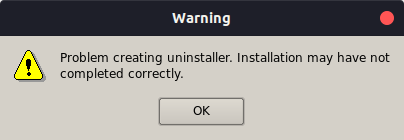
After adding the path to cyclone v file to install the device, following error dialog box appeared .
First the error_window appeared and after clicking the okay button. the next error window opened.
After that it promoted for a reboot, but after reboot it asked for the license file again and then showed no device installed.
Kindly look into it.
3 Replies
 Qazi_Shahid
I have also checked the directory /home/.altera.quartus/
and there is only quartus2.qreg file in that directory and no .INI file are present there.
 SyafieqS
Super Contributor
Hi Qazi,
Could you install following libraries?
Install libc6:i386, libncurses5:i386, libxtst6:i386, libxft2:i386, libstdc+
+6:i386, libc6-dev-i386, lib32z1, lib32ncurses5, lib32bz2-1.0, and libpng12
libraries.
Note: • For Ubuntu 18.04, additionally install libqt5xml5 and liblzma-dev libraries.
Once done, reinstall Quartus Prime. You may need to refer to document below related to
Intel® FPGA Software Installation and Licensing. Please follow all the procedures that should be good already.
https://www.intel.com/content/dam/www/programmable/us/en/pdfs/literature/manual/quartus_install.pdf
Then make sure the device .qdz file is in same directory with Quartus installer. Install the device support.
Thanks,
Regards
- SyafieqS
Hi Qazi,
Any updates?