Forum Discussion

simozz New Contributor
5 years agoNew ContributorDE0-Nano Quartus Lite 19.1.0 Linux - Programming Failed - Error (209040): Can't access JTAG chain
Hello,
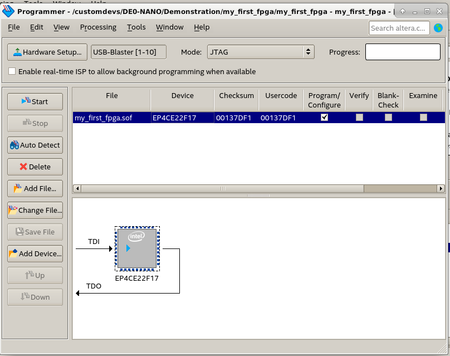
I am trying to use my DE0-Nano board with Quartus version Lite 19.1.0 (Debian 10) and my_first_fpga example, but I cannot achieve to successfully program the FPGA.
Quartus correctly detec...
 5 years ago
The problem seems to be caused by a SW issue..
Following the suggestion posted here
https://electronics.stackexchange.com/questions/239882/altera-cyclone-ii-jtag-after-as-programming
I installed libudev:i386:
$ sudo apt-get install libudev1:i386
$ sudo ln -sf /lib/x86_64-linux-gnu/libudev.so.1 /lib/x86_64-linux-gnu/libudev.so.0
Then, after pluggin the board:
$ sudo killall jtagd
$ jtagd --user-start
$ jtagconfig
1) USB-Blaster [1-10]
  020F30DD   10CL025(Y|Z)/EP3C25/EP4CE22
The above script can be placed the bin directory of installation, for example /opt/intelFPGA_lite/20.1/quartus/bin/usbblaster.sh (yes, I switched to 20.1 version):
#!/bin/sh /usr/bin/killall jtagd /opt/intelFPGA_lite/20.1/quartus/bin/jtagd --user-start and udev rules set as follows:
SUBSYSTEMS=="usb", ACTION=="add", ATTRS{idVendor}=="09fb", ATTRS{idProduct}=="6001", MODE="0666", GROUP="plugdev", SYMLINK+="usbblaster", RUN+="/opt/intelFPGA_lite/20.1/quartus/bin/usbblaster.sh"Works like a charm.
Simon

JohnT_Altera Regular Contributor
5 years agoRegular ContributorHi,
The reason it is not working is due to the USB setup is not setup correctly where the blaster is not working previously. Once the setup is correct then if there is any issue where the Quartus error mention that it is not able to detect any device then we can use that features.


