Forum Discussion

 Contributor
TimeQuest can't analysis the clock from the PLL
 5 years ago
Hi SyafieqS_Intel, finally, I use the command, /*synthesis keep */, to keep relative port so that TimeQuest can find the CLK[4] port of the PLL.
The CLK[4] port of the PLL in post-fit is "pll|altpll_component|auto_generated|pll1|clk[4]". Thank you, SyafieqS_Intel, very much.
ContributorHi sstrell, thank for your suggestion.
The design can be synthesized and APR. Unfortunately, Quartus13.1 miss the CLK[4] port of PLL after Fitter so that TimeQuest can't find the CLK[4] port of PLL to analysis. Following pictures are the PLL Megawizard and PLL usage. The differences among clocks of PLL only are the multiply parameter and divide parameter. I don't know what's wrong here.
Warning: CLK[4] isn't connected.
PLL Megawizard:
PLL usage:

 Super Contributor
What is the logic for sel to the mux? If it's not switching, the clock may have been optimized away. As you can see, clock 4 doesn't even show up in the PLL usage report. This is why I suggested previously to add a clock control block and use the switching there instead of creating a mux like this.
You can try to confirm the clock was optimized away by looking at the post-fit Technology Map Viewer and see if you see the clock coming out of the PLL at all. You could also check the compilation report for warning messages about the clock being optimized away or other reasons why it may have disappeared.
- NuvKFC5 years ago
Hi sstrell, thank for your suggestion.
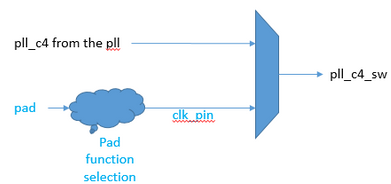
The 'sel' signal is from a register. It can be read or write by CPU. The 'sel' signal can be toggled. How to check that Quartus will optimize this signal?
Unfortunately, Quartus tells me that I can't use ALTCLKCTRL Megawizard function to switch clock because Quartus said that the 'clk_pin' signal is from a COMBOUT so that Quartus can't synthesis it. Can I do something else to fix this?
OK, I will try to check in post-fit by the Technology Map Viewer and warning messages. Could you please give some hint about how to check warning messages' by your experience? I only can find the warning message like the following picture when I key in the keyword 'pll*clk'.
Thank you very much.


