Forum Discussion

 Contributor
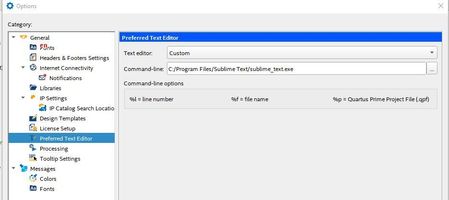
Sublime -> how to define it as External Preferable Editor?
- 3 years ago
I believe the problem occur if you close the Quartus and reopen it.
The double quote in the command line seem to be removed automatically, causing the tool can't find the tool.
Add back the double quote in the command line and it should works. Example:
"C:\Program Files\Sublime Text\sublime_text.exe"
Or copy the .exe to the Quartus installation path (without any space in between). Example:
C:\intelFPGA\sublime_text.exe (with or without the double quote)

 Super Contributor
Thanks for acknowledge the solution provided.
I’m glad that your question has been addressed, I now transition this thread to community support. If you have a new question, Please login to ‘https://supporttickets.intel.com’, view details of the desire request, and post a feed/response within the next 15 days to allow me to continue to support you. After 15 days, this thread will be transitioned to community support. The community users will be able to help you on your follow-up questions.
Thank you.
Best Regards,
Richard Tan
p/s: If any answer from the community or Intel Support are helpful, please feel free to give best answer or rate 9/10 survey.


