Forum Discussion

 Contributor
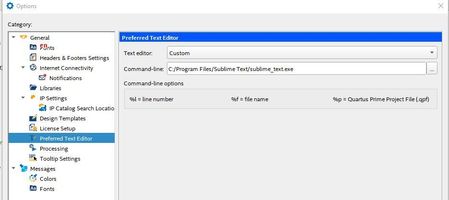
Sublime -> how to define it as External Preferable Editor?
- 3 years ago
I believe the problem occur if you close the Quartus and reopen it.
The double quote in the command line seem to be removed automatically, causing the tool can't find the tool.
Add back the double quote in the command line and it should works. Example:
"C:\Program Files\Sublime Text\sublime_text.exe"
Or copy the .exe to the Quartus installation path (without any space in between). Example:
C:\intelFPGA\sublime_text.exe (with or without the double quote)

 Super Contributor
I believe the problem occur if you close the Quartus and reopen it.
The double quote in the command line seem to be removed automatically, causing the tool can't find the tool.
Add back the double quote in the command line and it should works. Example:
"C:\Program Files\Sublime Text\sublime_text.exe"
Or copy the .exe to the Quartus installation path (without any space in between). Example:
C:\intelFPGA\sublime_text.exe (with or without the double quote)


