Forum Discussion

 New Contributor
Quartus Web Edition (Free) 13.0.1 Build 232 Linux Browser No Opening
I have installed Quartus Web Edition (Free) 13.0.1 Build 232 for Linux on Ubuntu 20.04.2 LTS.
Selecting 'Open interactive tutorial' from the initial modular window does nothing.
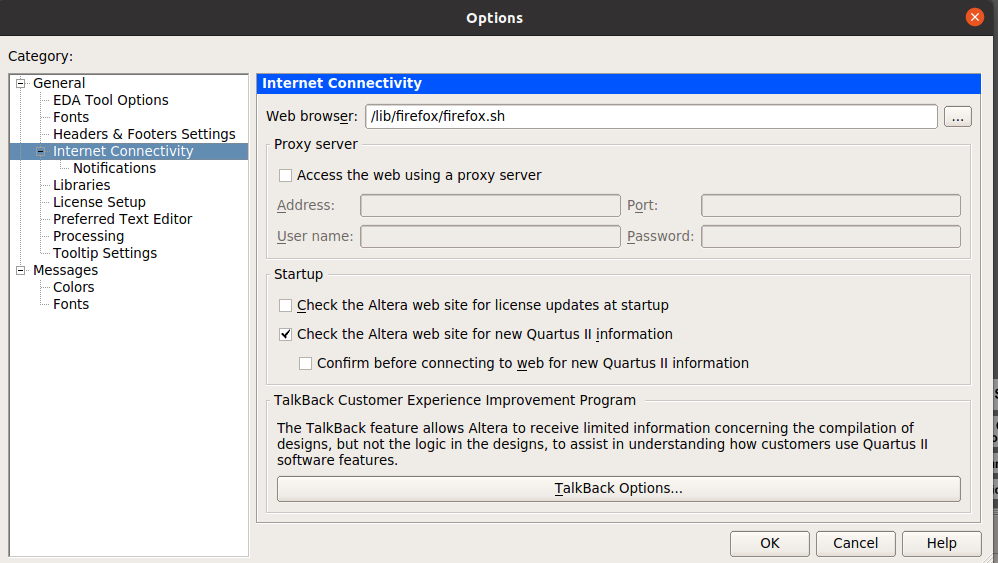
I closed the window and selected 'Options' from the 'Tools' drop-down. Entering '/lib/firefox/firefox.sh' into the Web Browser field in 'Internet connectivity.
Closing the application and re-loading still produced no result when selecting the 'Open interactive tutorial' option.
What I am doing wrong, please?
Hi,
Are you sure the path for Firefox is correct? Shouldn't it have a parent folder before lib, resulting into something like "/usr/lib/firefox/firefox.sh"? Or maybe "../lib/firefox/firefox.sh" Try searching for the firefox.sh file and copy the path into the Options tool.
You could also change to a different browser, or reinstall Quartus.
Regards,
Nurina
3 Replies
 Nurina
Regular Contributor
Hi,
Are you sure the path for Firefox is correct? Shouldn't it have a parent folder before lib, resulting into something like "/usr/lib/firefox/firefox.sh"? Or maybe "../lib/firefox/firefox.sh" Try searching for the firefox.sh file and copy the path into the Options tool.
You could also change to a different browser, or reinstall Quartus.
Regards,
Nurina
 FPGANovice
Hi Nurina,
Changing browsers (chromium) helped. But the page just shows a blue band at the top of the browser which flickers at am alarming rate.
At that point, I gave up and used YouTube instead.
kindest regards,
Graham
- Nurina
Hi Graham,
You could also access the Help Webpage through your browser here: https://www.intel.com/content/www/us/en/programmable/quartushelp/13.0/mergedProjects/quartus/gl_quartus_welcome.htm
With that, I now transition this thread to community support. If you have a new question, feel free to open a new thread to get the support from Intel experts. Otherwise, the community users will continue to help you on this thread. Thank you.
Regards,
Nurina
P/S: If you like my comment, feel free to give Kudos. If my comment solved your problem, feel free to accept my comment as solution!