Forum Discussion

IDeyn Contributor
5 years agoContributorQuartus 20.1 software licensing issue
Hi all!
I have an issue with Quartus 20.1 software licensing.
The same project in Quartus 18.0 compiles successfully.
I checked from the Self Service Licensing Center that license fi...
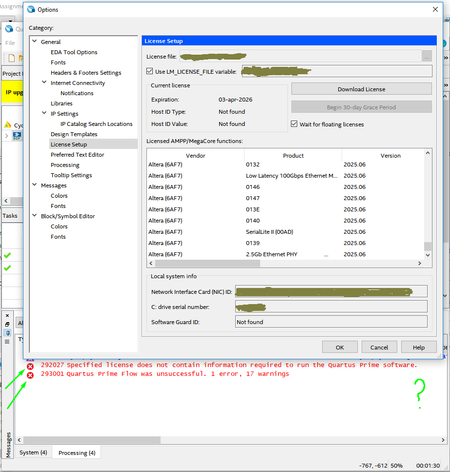
 5 years ago
Hello everyone!
In the end, everything worked out, and the problem was resolved.
It is not known for certain whether one or all of them helped.
report .asm.rpt was not generated at all and there was nothing in the error.log.
I did the following:
1. Reinstalled the license daemon from this link https://www.intel.com/content/www/us/en/programmable/support/support-resources/download/licensing/daemons.html
2. Recreated the license file again (it had a lot of duplicates). I left the most recent files in it.
3. Configured the server again using this video https://www.youtube.com/watch?v=llLaWatUbe8 and this troubleshooter helps https://www.intel.com/content/www/us/en/programmable/support/support-resources/knowledge-base/ts-index/lic.html
4. I also configured the firewall again (this turned out to be critical on one of the machines)
Together, these actions helped me to solve the problem. I hope that these actions will help someone else.PS: Thank you for your responsiveness, AR_A_Intel.--
Best regards,
Ivan

AR_A_Intel Super Contributor
5 years agoSuper ContributorTo narrow down the issue. Can you provide information on your?
1) Debug/error.log file
2) License.dat file
3) Error message screenshot
4) Screenshot of Quartus >> tools >> license setup
5) assembler report .asm.rpt file
• The assembler report is located in <Project directory>/Output_files/<project_name>.asm.rpt.
And for privacy, you can reply/attach your file in private message.
- IDeyn5 years ago
Hello everyone!
In the end, everything worked out, and the problem was resolved.
It is not known for certain whether one or all of them helped.
report .asm.rpt was not generated at all and there was nothing in the error.log.
I did the following:
1. Reinstalled the license daemon from this link https://www.intel.com/content/www/us/en/programmable/support/support-resources/download/licensing/daemons.html
2. Recreated the license file again (it had a lot of duplicates). I left the most recent files in it.
3. Configured the server again using this video https://www.youtube.com/watch?v=llLaWatUbe8 and this troubleshooter helps https://www.intel.com/content/www/us/en/programmable/support/support-resources/knowledge-base/ts-index/lic.html
4. I also configured the firewall again (this turned out to be critical on one of the machines)
Together, these actions helped me to solve the problem. I hope that these actions will help someone else.PS: Thank you for your responsiveness, AR_A_Intel.--
Best regards,
Ivan


