Forum Discussion

Altera_Forum Honored Contributor
12 years agoHonored ContributorInstalling Quartus II device files (.qdz) on Quartus II 13.1
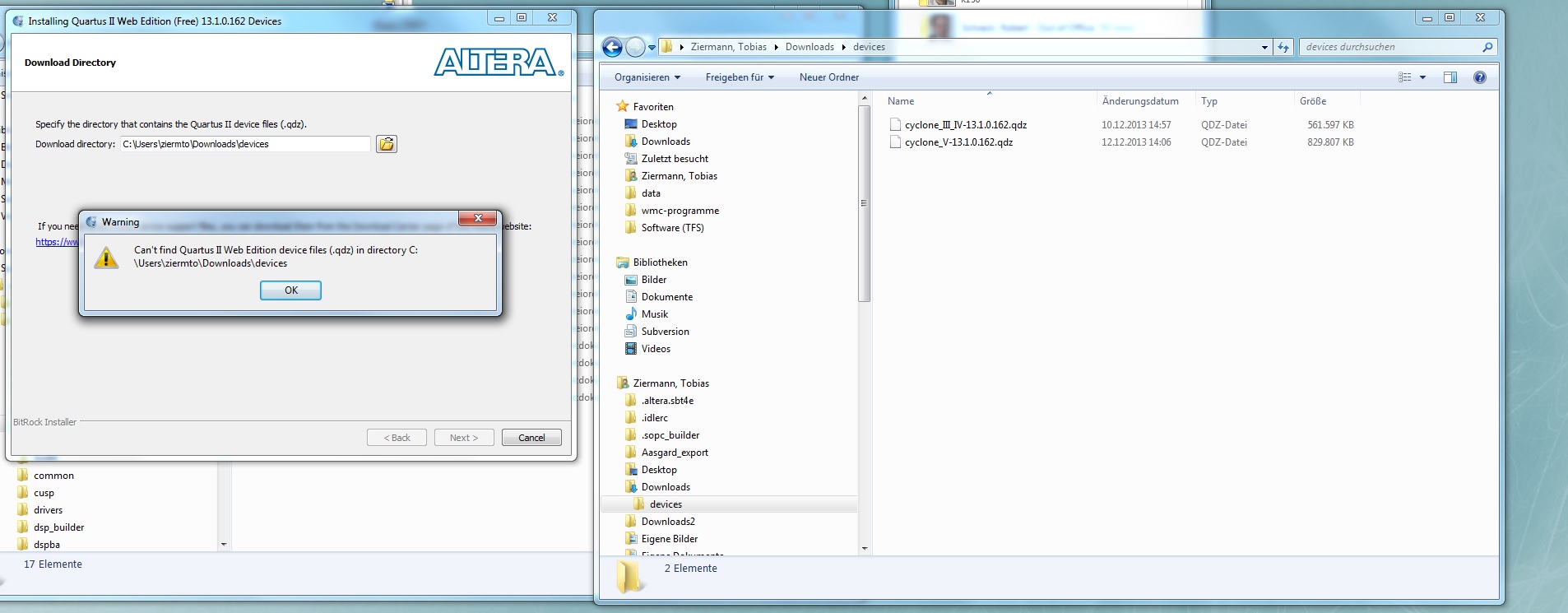
Hi, I'm trying to install device files for Quartus II 13.1 on Windows 7, but get the error "Can't find Quartus II Web Edition device files (.qdz) in directory ..." (see picture) https://www.a...

Altera_ForumHonored Contributor
12 years agoHonored Contributor --- Quote Start --- Hi, it may be caused by the redirection of special path (your user's name <--> c:\users\name_user\...) move the *.qdz to a easy directory ("c:\downloads\" for example), and then install from them. Regards --- Quote End --- I also tried c:\ and c:\temp no change. I also tried on another PC. Checked MD5 Checksum. Always the same problem. It must be something with my installation procedure or the files. Installation procedure: 1. Copy all Files to Desktop 2. Start QuartusSetupWeb-13.1.0.162.exe 3. At end of installation start Quartus 4. Start device installer from Quartus popup window 5. Select Folder 6. Get Error Files: QuartusSetupWeb-13.1.0.162.exe cyclone_V-13.1.0.162.qdz cyclone_III_IV-13.1.0.162.qdz Maybe someone sees any irregularities. Any help is appreciated