Altera_Forum Honored Contributor
Honored ContributorHonored Contributor Honored Contributor
You may want to check http://www.altera.com/support/examples/timequest/exm-tq-basic-source-sync.html (http://www.altera.com/support/examples/timequest/exm-tq-basic-source-sync.html). In your case, replace the PLL name with your clock register name.
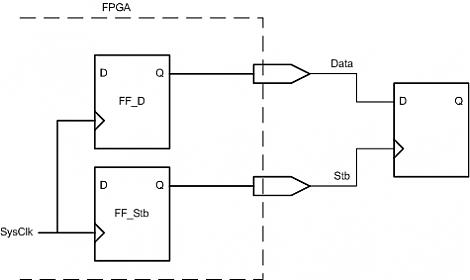
--- Quote Start --- Hi, I have tried the following: create_generated_clock -name Stb_clk -source Sys_Clk -divide_by 1 [get_ports {Stb}] When I update the timing netlist I get the following warnings / errors: Warning: Node: ...|HPIController:hpictrl|snHDS1 was determined to be a clock but was found without an associated clock assignment. Warning: No paths exist between clock target "pHPI_nHDS1" of clock "HpiStb_clk" and its clock source. Assuming zero source clock latency. (Note I have left the original names in the errors: snHDS1 is the name of the output of FF_Stb. It gets directly assigned - i.e no logic inbetween - to pHPI_nHDS1, which is the name of the port). The problem is that TimeQuest does not account fo the skew between the Sys_Clk and the Stb output pin. What I then did was to say: create_generated_clock -name Stb_clk_tmp -source Sys_Clk -divide_by 1 [get_pins {FF_Stb|q}] create_generated_clock -name Stb_clk -source Stb_clk_tmp -divide_by 1 [get_ports {Stb}] This seems to work and on first sight the setup / hold analysis seems right. But it does not feel right to create two clocks. Is there another way to do this? Am I doing something wrong? Regards, Niki --- Quote End --- You don't need the clock on the output port, if you use the -reference_pin. Something like: create_generated_clock -name Stb_clk_tmp -source Sys_Clk -divide_by 1 [get_pins {FF_Stb|q}] set_output_delay -clock Stb_clk_tmp -reference_pin [get_ports Stb] 1.200 [get_ports data_out] Hope this helps DK