Forum Discussion

 Occasional Contributor
Cannot select specific target device
Hi, I am using Quartus Prime 18.1 build 625
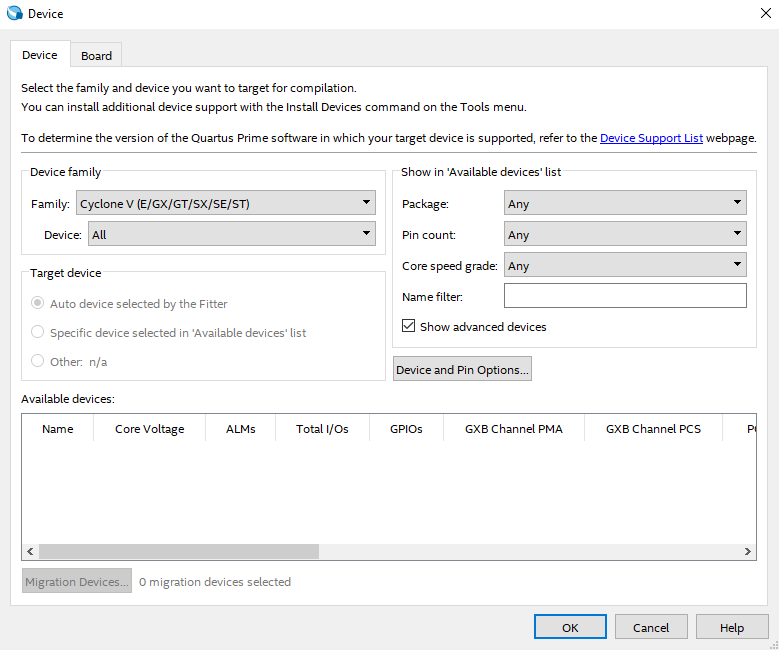
I cannot change the target device I am compiling to. It will not allow me to select a specific FPGA, it only chooses the default Cyclone V FPGA. The options to change are grayed out; I included a screenshot to show you all.
Does anyone know of a way to fix this?
It looks like your Quartus installation is messed up. Can you try reinstalling the .qdz file for Cyclone V devices (or maybe delete and completely reinstall Quartus)?
5 Replies
 sstrell
Super Contributor
It looks like your Quartus installation is messed up. Can you try reinstalling the .qdz file for Cyclone V devices (or maybe delete and completely reinstall Quartus)?
 AWann1
A full removal and reinstallation fixed my issue
- RichardT_altera
Same suggestion with sstrell, I would reinstall the latest Quartus Standard version 21.1.
You may checkout the quick start user guide here:
 VenT_Altera
Frequent Contributor
Hi,
Do you have any updates from the previous suggestion?
- RichardT_altera
I’m glad that your question has been addressed. With that, I will now transition this thread to community support. If you have a new question, feel free to open a new thread to get the support from Intel experts. Otherwise, the community users will continue to help you on this thread. Thank you.
Best Regards,
Richard Tan
p/s: If any answer from the community or Intel Support are helpful, please feel free to give best answer or rate 9/10 survey.