Forum Discussion

 Contributor
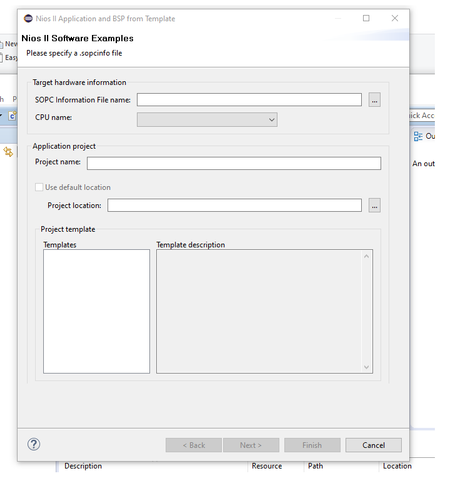
Template is empty in the Nios II application and BSP from Template
 Contributor
Here are the full text from the working console, where and who start executing: nios2-swexample-create.exe --describeAll (c:\intelfpga_pro\21.3\quartus\bin64)? why my new installed machine not start to run this command? I think it is close to the answer. appreciate your help.
David
------------------------------------------------------------------------------------------------------
Executing: nios2-swexample-create.exe --describeAll (c:\intelfpga_pro\21.3\quartus\bin64)
<nios2-swexample name="memtest" display_name="Memory Test">
Memory Test allows you to test the RAM and flash memory on your board. The application presents a menu to choose which memory to test.
Because the RAM test is destructive, do not run the RAM test on any memory being used by this program, including code, data, and exception locations.
For details, click Finish to create the project and refer to the readme.txt file in the project directory.
The BSP for this template is based on the Altera HAL operating system.
For information about how this software example relates to Nios II hardware design examples,
refer to the Design Examples page of the Nios II documentation available with your installation at:
<installation_directory>/nios2eds/documents/index.htm.
</nios2-swexample>
<nios2-swexample name="count_binary" display_name="Count Binary">
Count Binary exercises the push-button, LCD, LED, and seven-segment display peripherals. Count Binary displays a running count of 0x00 to 0xff on output peripherals, while responding to input on the push-buttons. This example runs with or without the MicroC/OS-II RTOS and supports hardware systems that do not include all the peripherals listed.
For details, click Finish to create the project and refer to the readme.txt file in the project directory.
The BSP for this template is based on the Altera HAL operating system. To use a BSP based on a different
operating system, click Next and select the BSP from the BSP projects list.
For information about how this software example relates to Nios II hardware design examples,
refer to the Design Examples page of the Nios II documentation available with your installation at:
<installation_directory>/nios2eds/documents/index.htm.
</nios2-swexample>
<nios2-swexample name="hello_world_small" display_name="Hello World Small">
Hello World Small prints 'Hello from Nios II' to STDOUT. The project occupies the smallest memory footprint possible for a hello world application.
This example runs with or without the MicroC/OS-II RTOS and requires an STDOUT device in your system's hardware.
For details, click Finish to create the project and refer to the readme.txt file in the project directory.
The BSP for this template is based on the Altera HAL operating system with reduced code footprint.
For information about how this software example relates to Nios II hardware design examples,
refer to the Design Examples page of the Nios II documentation available with your installation at:
<installation_directory>/nios2eds/documents/index.htm.
</nios2-swexample>
<nios2-swexample name="blank_project" display_name="Blank Project">
Blank Project creates an empty project to which you can add your code.
For details, click Finish to create the project and refer to the readme.txt file in the project directory.
The BSP for this template is based on the Altera HAL operating system. To use a BSP based on a different
operating system, click Next and select the BSP from the BSP projects list.
For information about how this software example relates to Nios II hardware design examples,
refer to the Design Examples page of the Nios II documentation available with your installation at:
<installation_directory>/nios2eds/documents/index.htm.
</nios2-swexample>
<nios2-swexample name="board_diag" display_name="Board Diagnostics">
Board Diagnostics tests the LCD, the LED(D0-D7), and the seven-segment display peripherals, and the JTAG UART.
For details, click Finish to create the project and refer to the readme.txt file in the project directory.
The BSP for this template is based on the Altera HAL operating system.
For information about how this software example relates to Nios II hardware design examples, refer to the Design Examples page of the Nios II documentation available with your installation at <installation_directory>/nios2eds/documents/index.htm.
</nios2-swexample>
<nios2-swexample name="hello_alt_main" display_name="Hello Freestanding">
Hello Freestanding is functionally equivalent to Hello World, but uses alt_main() as its entry point for advanced control of program initialization.
This example runs with or without the MicroC/OS-II RTOS. It requires an STDOUT device in your system's hardware.
For details, click Finish to create the project and refer to the readme.txt file in the project directory.
The BSP for this template is based on the Altera HAL operating system.
For information about how this software example relates to Nios II hardware design examples,
refer to the Design Examples page of the Nios II documentation available with your installation at:
<installation_directory>/nios2eds/documents/index.htm.
</nios2-swexample>
<nios2-swexample name="hello_world" display_name="Hello World">
Hello World prints 'Hello from Nios II' to STDOUT.
This example runs with or without the MicroC/OS-II RTOS and requires an STDOUT device in your system's hardware.
For details, click Finish to create the project and refer to the readme.txt file in the project directory.
The BSP for this template is based on the Altera HAL operating system.
For information about how this software example relates to Nios II hardware design examples,
refer to the Design Examples page of the Nios II documentation available with your installation at:
<installation_directory>/nios2eds/documents/index.htm.
</nios2-swexample>
<nios2-swexample name="float2_performance" display_name="Float2 Performance">
Float2 Performance compares the performance of floating-point operations using the Floating Point Hardware 2 custom instructions vs. software emulation. After each operation is performed, a table is printed showing the performance of the custom instructions and software emulation.
This code must be compiled with GCC optimization level -O2.
The Floating Point Hardware 2 component is the 2nd generation of floating-point custom instructions for Nios II. It offers improved performance, hardware acceleration of more operations, and reduced resource usage relative to the 1st generation. Results are not fully IEEE 754 compliant due to the implementation of simplified rounding.
System Requirements
*******************
The following component must be connected to the Nios II:
- 'Floating Point Hardware 2' component
- 'Performance Counter Unit' component
- Named 'performance_counter_0'
- At least 2 sections
- Must be connected to Nios II clock
- Some character device (e.g. JTAG UART)
</nios2-swexample>
<nios2-swexample name="memtest_small" display_name="Memory Test Small">
Memory Test allows you to test the RAM memory on your board.
Because the RAM test is destructive, do not run the RAM test on any memory being used by this program, including code, data, and exception locations.
For details, click Finish to create the project and refer to the readme.txt file in the project directory.
The BSP for this template is based on the Altera HAL operating system.
For information about how this software example relates to Nios II hardware design examples,
refer to the Design Examples page of the Nios II documentation available with your installation at:
<installation_directory>/nios2eds/documents/index.htm.
</nios2-swexample>
<nios2-swexample name="float2_functionality" display_name="Float2 Functionality">
Float2 Functionality is a basic functional test of the Floating Point Hardware 2 component. The program checks the results and displays a pass/fail message.
The Floating Point Hardware 2 component is the 2nd generation of floating-point custom instructions for Nios II. It offers improved performance, hardware acceleration of more operations, and reduced resource usage relative to the 1st generation. Results are not fully IEEE 754 compliant due to the implementation of simplified rounding.
System Requirements
*******************
The following components must be connected to the Nios II:
- 'Floating Point Hardware 2' component
- Some character device (e.g. JTAG UART)
</nios2-swexample>
<nios2-swexample name="float2_gcc" display_name="Float2 GCC">
Float2 GCC Example shows how to infer the floating point operations provided by the Floating Point Hardware 2 component. A user may inspect the objdump file to see the code generated by GCC.
The Floating Point Hardware 2 component is the 2nd generation of floating-point custom instructions for Nios II. It offers improved performance, hardware acceleration of more operations, and reduced resource usage relative to the 1st generation. Results are not fully IEEE 754 compliant due to the implementation of simplified rounding.
System Requirements
*******************
The following component must be connected to the Nios II:
- 'Floating Point Hardware 2' component
</nios2-swexample>
<nios2-swexample name="hello_ucosii" display_name="Hello MicroC/OS-II">
Hello MicroC/OS-II uses the MicroC/OS-II RTOS. You can use this example as a starting point for developing Nios II MicroC/OS-II applications.
For details, click Finish to create the project and refer to the readme.txt file in the project directory.
The BSP for this template is based on the Micrium MicroC/OS-II operating system.
For information about how this software example relates to Nios II hardware design
examples, refer to the Design Examples page of the Nios II documentation available with your installation at:
<installation_directory>/nios2eds/documents/index.htm.
Micrium's uC/OS-II can be used free of charge for non-commercial purposes and academic projects only.
This is not open-source software.
Use of the code is subject to the terms of an end-user license agreement, please see the license files included in the BSP project.
</nios2-swexample>
ContributorI also notice that when I run Nios II----> BSP editor. I will have the following error message.
any ideas.


