JBlec2 Occasional Contributor
Occasional ContributorOccasional ContributorUnfortunately i dont know which IPs i need to include in Qsys. I now additionaly try the Monitor Pro Program of Intel but i think like the HDMI TX Demo showed me something is wrong with my little HDMI Display. But ok this is another topic. important would be .. how to find out the correct IPs for Quartus and how connect them , so that the nios can use the given given example .
There is a table of used IPs :
Is this the soluton ? Why dont they write how to connect them ?
I/O Peripheral Qsys Core
On-chip memory character buffer Character Buffer for Video Display
SD Card SD Card Interface
Red LED parallel port Parallel Port
Expansion parallel ports Parallel Port
Slider switch parallel port Parallel Port
Pushbutton parallel port Parallel Port
JTAG port JTAG UART
Interval timer Interval timer
System ID System ID Peripheral
Audio port Audio
Video port Pixel Buffer DMA Controller
Thank you :D

 Regular Contributor
HI,
I presume you already installed "Intel FPGA Monitor Program" where all the example design code is available.
For instance, you can use Quartus software to open up DE10-Nano example design where every design blocks are connected nicely for you
While the NIOS II C code example design is available in
Thanks.
Regards,
dlim
Occasional Contributorwow it works.
I went down to your given paths and also discovered the directories a little bit by myself. First I tried the FPGA Monitor Program - but it didnt work xD So I opened the .qpf - clicked on the programmer and uploaded the .sof . Then I checked if my FPGA has connection. It had. I saw that the HAL enviromnent is already there . I only had to the main program: video.c and the address maps located in the lib folder University_Program\Computer_Systems\DE10-Nano\DE10-Nano_Computer\software.
I compiled it and my HDMI Display showed Intel FPGA Computer System within a blue rectangle.
Thank you for your time !
Sometimes the solution is close to us and simple :D
( i know that this is a prepared environment but anyway it is an important step for me :D)
Now i finally can begin to manipulate the output :D
Regular ContributorGreat ! I am glad thing works out for you
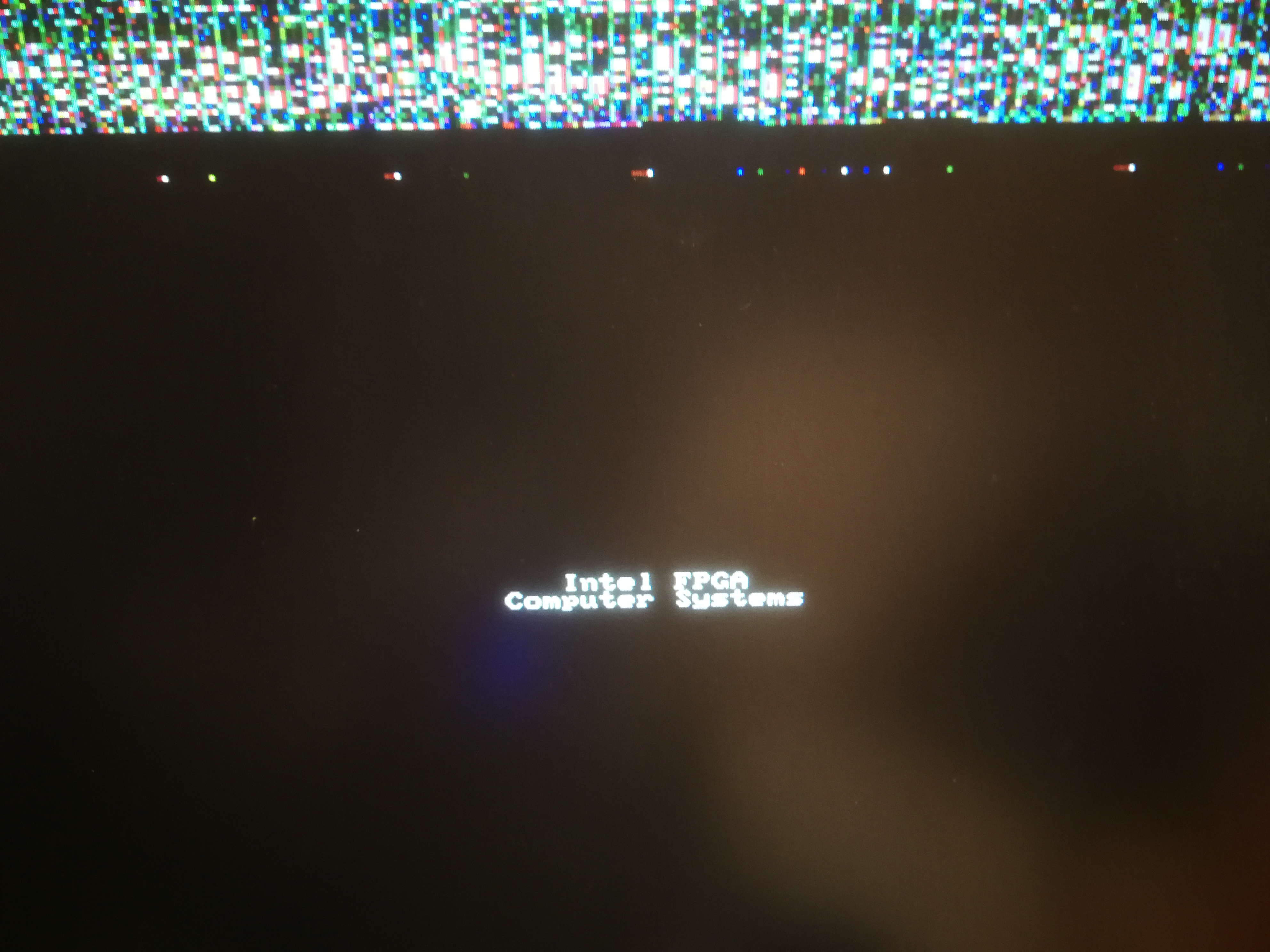
Occasional ContributorDamn, it turned out that i just had some luck: First time it worked diretly second time i needed to reinstall. Today it even didnt work after reinstall: It just shows some weird random pixels in the first 6 rows . I checked it last time on some "good" displayS and now i am working with a adapter hdmi to vga. So this shouldnt be the reason.
I now recompile the project DE10 nano computer. Maybe it has some trouble with the pin allocation ? But I really use de10-nano. So it should be the correct project.
If it doesnt work I will post more details :D
I could also check the Platform Designers Adresses and the adresses listetd in the .h file for the Nios.
Wow it takes now half an hour to compile everything.. Although I made some setting changes for faster compilation etc...
😀
Occasional ContributorNow I created a new project with the Intel FPGA Monitor Program. I configured with the example video.
Then ..like always... nothing happens after upload.. then I used eclipse put in again my files (video.c and libs) and it worked. Then I made some change in the String. then a new comination appeared: on top of the screen random pixel appeared and the string also appeared. but I couldn change the string now... needed to download the sof with fpga monitor program again and again needed to put in video.c... now it worked again. but only for 1 time. after changing the string again it hung up or something... now i am trying the third time
Occasional ContributorOccasional Contributormaybe it is because of my run configurations.... i changed the target processor and byte stream devices .. now it works .. i will check it again in a few days :D
Occasional Contributorhmm with the Intel fpga Monitor Programm it always works fine... but in Quartus in combination with eclipse for nios.. It sometime doesnt work , maybe because of the run configurations.... I show you what i mean in the attachment. i understand this better.. but maybe you have a idea :D
thanks . have a good day ! :D
Occasional ContributorNow it doesnt work anymore. It never shows the demo on my hdmi screen :(
Just a random bit order in top of the screen.
Hmm. the byte stream device is just for the console output ?
The processor is one of the two NIOS which come with this DEMO
I dont know whats up
Has someone an idea ?
I always choose the hello world simple template project... i also tried the hello word template
Occasional Contributor