Forum Discussion

 New Contributor
Tone Mapping Operator IP Malfunctioning
 11 months ago
Hi @dscully David,
Does this IP have undocumented restrictions on input resolution?
>> Yes, there is restrictions on the input resolution.
For the input width, it needs to be multiple of the pixels in parallels (PIP) and the number of internal tiles (it is fixed as 4)- So, if PIP = 4 and Number of tiles = 4, then the width needs to be multiple of 4x4 = 16
- For the given two widths you could see that condition is not met, 1944/16 = 121.5 and 3268/16=204.25
- I suggest your to try: 1952 for the first case,
- and 3280 for the second case, then if need be, you could use a clipper to put the width back to your desired width.
- For the input height, it needs to be multiple of the number of internal tiles (it is fixed as 4)
- In this case, your current values are both fine.
Regards,
Wincent_Altera
 Regular Contributor
Hi @dscully David,
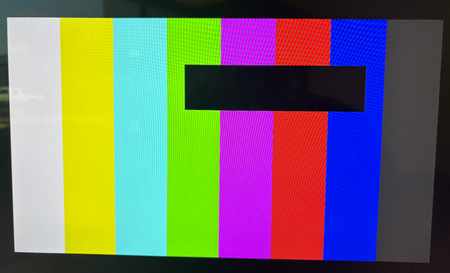
If you not perform that , you wont see the black box ? Am I get this correct ?
If I set the resolution with intel_vvp_tmo_set_resolution and then try to exit bypass mode the component stops producing frames.
>> just try to understand why you not use the default setting but trying out this ?
>> Is that part of your project requirement ?
>> If I understand correctly from you, by default on VVP design this "black box" issue is not observed in 2k or 800x800 .
But once you make the change as your previous reply the black box came out , am I understand this correctly ?
Regards,
Wincent
 New Contributor
Hi Wincent,
If I don't use ROI mode I don't see a black box. However, I expect in non-ROI mode for the component to function and not freeze the video pipeline when leaving bypass mode. I don't know what you mean by not using the "default settings". I am following the example from the documentation which clearly sets the resolution with intel_vvp_tmo_set_resolution:
By "default" this design does not perform its intended functionality regardless of resolution in ROI or non-ROI mode.
Thanks,
David
- Wincent_Altera1 year ago
Hi @dscully David,
Thanks for the clarification, now I am clear about your situation.
Please allow me to have sometime to check on this, it might take sometime.
Will get back to you as soon as possible.
Regards,Wincent
- Wincent_Altera1 year ago
Hi @dscully David,
Based on the information you provided so far, my initial guess would be that most likely the ROI has not been properly defined in the SW App.
BUT , Before jumping to conclusions, and assuming the TMO has been initialize correctly, we would like a Yes or No on the following questions.- When TMO is in Bypass mode (reg_0x154 = 0x1), does the video passthrough without any artifacts?
- When TMO is in Processing mode (reg_0x154 = 0x0), does the video passthrough without any artifacts?
- When TMO is in ROI mode (reg_0x154 = 0x2 or 0x6), does the video passthrough without any artifacts?
At the meantime, I will email you privately some Genlock demo that uses the TMO IP, and from the jtag-command you can modify a horizontal slider based on TMO ROI registers. (Let me know if you not receive it)
Regards,Wincent
- dscully1 year ago
Hi Wincent,
1. Yes, the video passes through without artifacts.
2. No, as soon as you switch from Bypass to Processing mode the IP stops producing frames.
3. No, black boxes appear based on the programmed ROI. The non-black box areas appears to be passed through.
To clarify, my earliest attempts did not use the ROI at all. I followed the "Software Driver Example". However, leaving bypass causes the core to stop producing frames immediately. I mentioned ROI because it produced different results than a IP freeze and thought it might be helpful for debug. I would be happy to see the IP function normally without ROI (full frame processing).
I received the design. I believe I have a copy of this design from a previous inquiry but I will verify tomorrow.
Thank you,
David


