Forum Discussion

 New Contributor
Parallel Flash Loader doesn't recognize CFI Flash

 Regular Contributor
Yes, you are right. Since it is not working with “system_max10” as well, the potential issue could be due to bitstream generation (POF) or the connection between MAX10, Cyclone V GT and CFI-Flash.
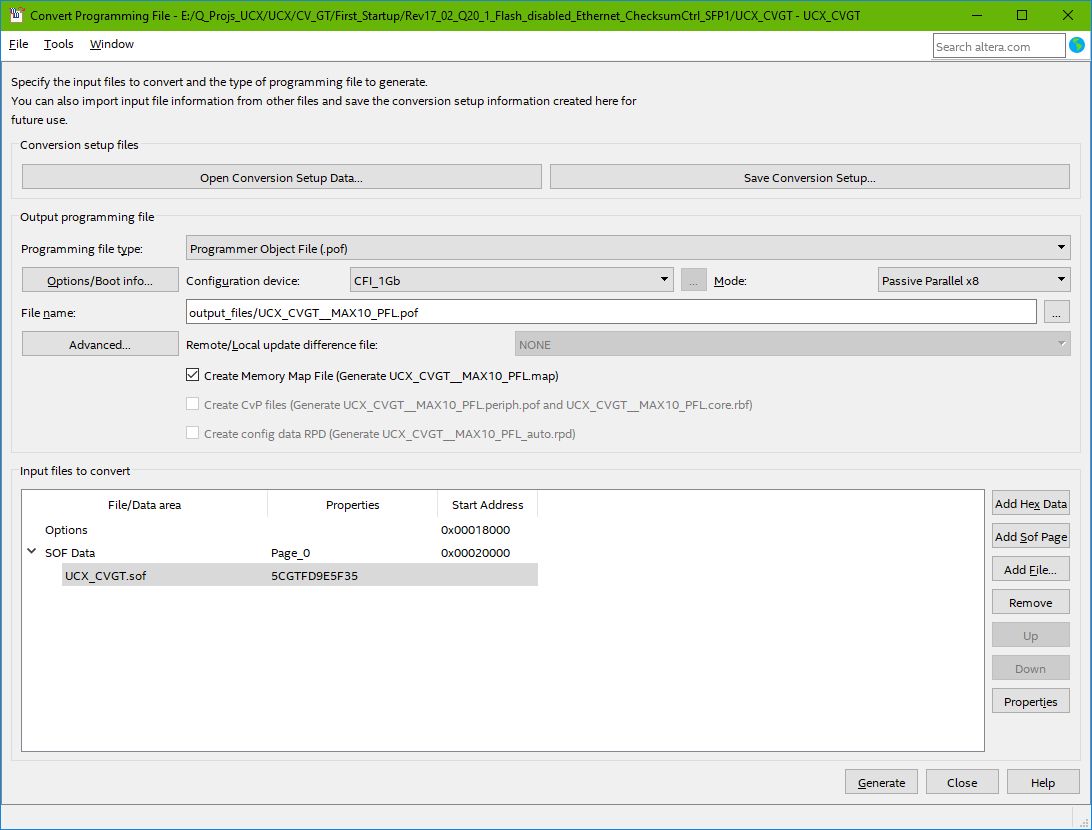
But first thing first, for the error you obtain during programming the POF with programmer, can you show me the screenshot of the programmer? Moreover, during POF file generation, have you selected the correct part number for the flash?
 EGrün4 years ago
Thank you for response.
1.) Attached you see a screenshot of the programmer. The MAX10 design with PFL was downloaded before. Screenshot was made with Quartus Webedition, but with Standardedition there is the same message.
Message:
Error (209025): Can't recognize silicon ID for device 1. A device's silicon ID is different from its JTAG ID. Verify that all cables are securely connected, select a different device, or check the power on the target system. Make sure the device pins are connected and configured correctly.
Error (18591): Can't recognize the Flash device that attached to device 1. The Flash device is not supported by Quartus Prime software.
Error (209012): Operation failed2.) POF file generation:
I attached a screenshot (POF_ file_generation.jpg). I selected standard CFI_1Gb for configuration device.
Additionally I attached the COF file UCX_CVGT__MAX10_PFL_new.zip. You can open the conversion setup data in programming file converter.