Forum Discussion

 Honored Contributor
Trouble getting my terasic DE0 board working on Windows 7 64 bit
Hi there, I am a university student using the altera quartus 2 software as part of our course, we are using the terasic DE0 board aswell.
I have a new laptop running win7 home premium 64bit, i downloaded quartus 2 11.1sp2 (32bit) web edition as this is what we were instucted to do by the university. I have installed the usb blaster drivers and have the jtag server running but i cannot connect to my DE0 board via the control pannel or the quartus software (no usb blaster selectable in the programing section), i get returned this error "quartus_prm download fail" Please could some one help me as its making me very behind with the university work. Many thanks10 Replies
 Altera_Forum
this is quite weird. do you have any screenshot of this?
- Altera_Forum
- Altera_Forum
have u got the usb blaster's driver installed? i think in windows 7, somehow we got to install the usb blaster's driver manually when plugging in the usb-blaster. browse to the folder <your installed quartus folder>\drivers\usb-blaster to install.
- Altera_Forum
Hi there,
you are facing the problem that ALTERA decided to limit the WebEditions (to whatever reason) to the 32-Bit version. This 32-Bit version includes the driver and the JTAG server in 32-Bit editions only, those are unfortunately not compatible with the 64-Bit operating system :-/ The most easy way to get this fixed is to download the stand-alone programmer version and install this package additionally. this will install the 64-Bit versions and the USB-Blaster will show up in the Programmer section of Quartus II WebEdition also... HTH, Carlhermann - Altera_Forum
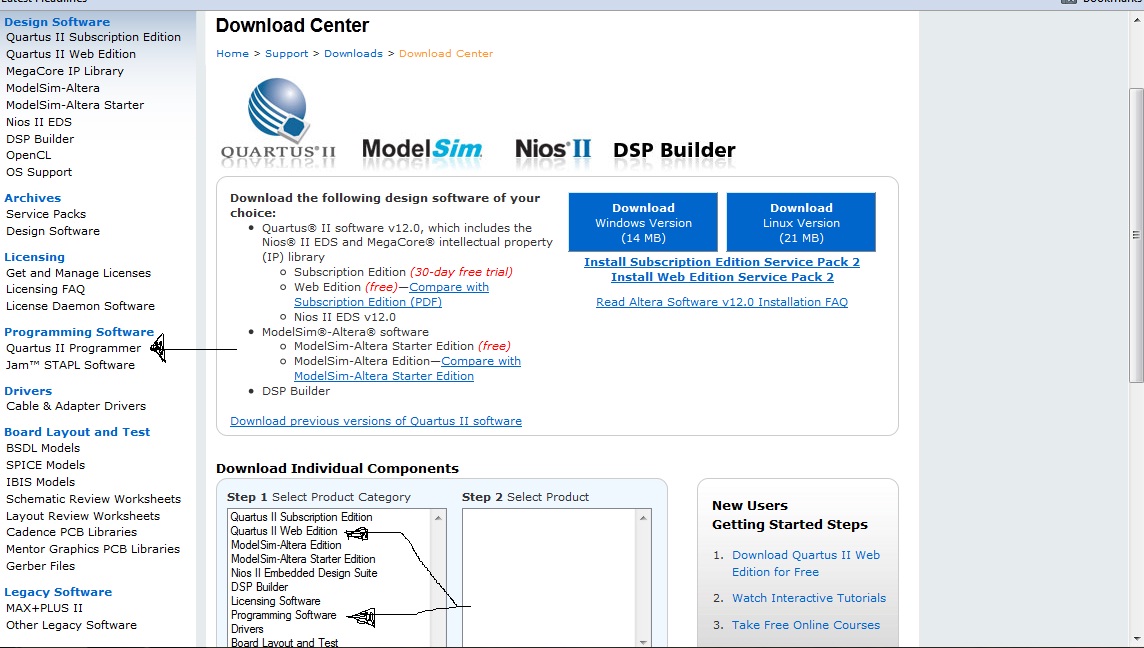
Thanks so much for you reply.... Right so i have to download the stand-alone programmer version and install this package additionally (by this package, do you mean altera web edition? and is it free?). Which bit of software would be the stand-alone programmer version?. This is the altera download centre (pictured below), am i selecting the right things?
- Altera_Forum
Hi,
yes, you've got it... The Programmer is just the programming part of the complete toolset ("identical" to Programmer tool in the WebEdition). As the Programmer cannot be used for anything else than programming the *.pof to the config EEPROM, *.sof by JTAG,... this package is free and therefore available in one edition only.. if you install both packages things should work :-) - Altera_Forum
Hi there,
i have uninstalled everything and installed the programmer on its own and checked the service which seems to work as i could see the usb blaster as a selection, but i installed the web edition (version 11.1) after as an addition and when i try to use the programmer in the web edition and its back to the start again i cant see it. Do you have any other suggestions. Many thanks - Altera_Forum
Hi,
sorry for being not precise enough.... The programmer installs the working driver and JTAG server and should be installed second as otherwise (programmer and then WebEdition) the WebEdition overwrites the driver and server by the unfortunately not working ones.. Thus you should now install the programmer (without uninstallation) and hopefully this fixes your troubles.. Regards - Altera_Forum
Thats great!!!! just wanted to let you know that everything working is working now, so happy.
http://www.alteraforum.com/forum//images/icons/icon7.gif - Altera_Forum
Hi,
thanks for your update,... Now you can start getting a FPGA designer :-)