Forum Discussion

 Occasional Contributor
Migrating design from MAXPLUS to Quartus
Hello,
I could successfully migrate the design from MAXPLUS (.gdf) to Quartus (.bdf).
I see that there exist a set of .snf and .scf files, which after reading the MAXPLUS documentation I found out that they are simulation related netlist and channel files. I tried opening the files in Quartus 13.1 but the tool is not able to read any data from these files.
Can anyone please tell me how can I access the content in the .scf and .snf file?
Any help is appreciated. Thank you!
6 Replies
 SyafieqS
Super Contributor
Hi Naveen,
You may refer to link below for details how to get access scf and snf file using Maxplus. You can try to open it using Waveform Editor in Quartus as it same thing which is functional tool as in Maxplus, let me know if works. Since you can migrate to bdf, you can straight away simulate your design in QP using Waveform Editor which later produce vho/vo netlist of your design.
https://www.intel.com/content/dam/www/programmable/us/en/pdfs/literature/manual/_81_gs2.pdf
 NShan12
Hello @SyafieqS
Thank you for the link.
The waveform editor can open only .vwf files and not .scf or .snf files. I tried this in both Q13.1 and QP18.1. Hence I still need to find out how to access the content in .scf and .snf files in Q13.1 or in QP.
Also, any idea how to use a .vec file to drive simulation inputs? I have a large vector file which has simulation test vectors. I would like to use this to drive the input signals during simulation.
- SyafieqS
Hi Naveen,
For the .vec file, you can save the file as .vwf file and open it in Waveform Editor for simulation.
Find link below as KDB related to your question
Thanks,
Regards
- NShan12
Thank you for your reply and the link.
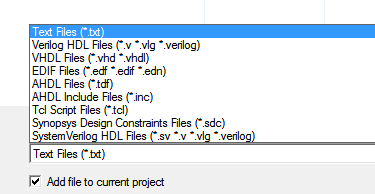
When I use the "save as" option to save the .vec file, I am not provided an option in Quartus 2 (V 13.0) to save the .vec file as .vwf. Please see the "save format.png" in the attachment.
The link you provided mentions that "The Quartus II Simulator supports MAX+PLUS II VEC stimulus files". By this I understand that I should be able to open .vec files in Quartus simulator (which is started by File -> New -> University program VWF). But when I try this, the Quartus simulator allows to open only .vwf and not any other file. See the "open vwf.png" in the attachment.
So, I am not able to proceed any further. May be I am missing something. Am I right in my understanding that Quartus simulator is same as the University program VWF package that can be launched by clicking:
File -> Open -> University program VWF?
- SyafieqS
Hi Naveen,
Yes it same as University program VWF which is the file is in .vwf format. It is always recommended for you to do sample tutorial and you may find link below, Quartus 2 Simulation using University Program.
ftp://ftp.intel.com/Pub/fpgaup/pub/intel_material/15.1/Tutorials/VHDL/Quartus_II_Simulation.pdf
Cheers
Syafieq
- NShan12
The document in the link does not describe anything regarding conversion between .vec and .vwf files. There is not even a single mention of ".vec" files in the complete document. Hence, I would like to ask this again:
How can one open a .vec file when the quartus simulator allows only .vwf files to be opened?
Also, How to save a .vec file with a .vwf extension when the tool doesn't provide such an option?
A short update on the .scf files. I could get MAXPLUS running and have now converted the .scf files to .tbl format as suggested in attachment 2.png. But unfortunately I am not able to even open the .tbl file in Quartus simulator.
Attachment 1.png says the .vwf and .tbl are interchangable. Is this all possible only in Quartus V9.1? these attachments are taken from the handbook of Quartus V9.1.
Thank you in advance.