Forum Discussion
JTAG- USB byteblaster programming cable
Dear sir,
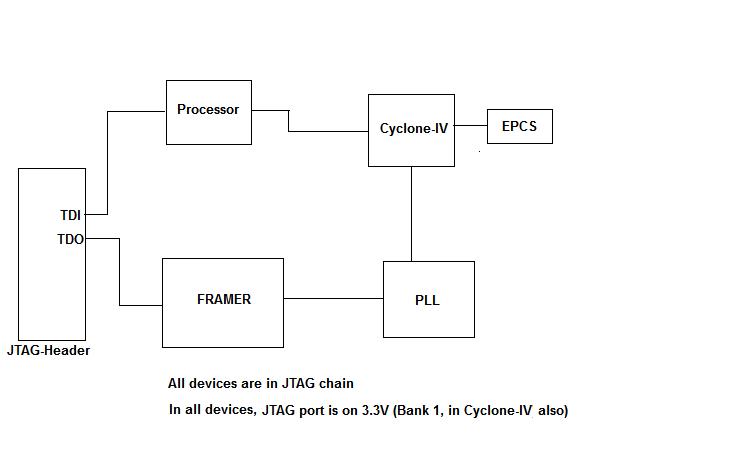
We plan to connect all the devices in JTAG chain (please find the document attached) in a board. When programming cyclone-IV FPGA using JTAG interface using USB byteblaster, do we need to connect pull up to TMS, TDI at 2.5V and pin 4 of JTAG header directly to 2.5V(VCCA) of cyclone IV FPGA instead of 3.3V(VCCIO of bank 1 is 3.3V). Please clarify whether 2.5V or 3.3V to be used at JTAG header(at pin 4 & pull ups on TDI(pin 9), TMS(pin 5) respectively) ? Best Regards, Thulasi Ramu J12 Replies
- Altera_Forum
Honored Contributor
http://www.altera.com/literature/hb/cyclone-iv/cyiv-51008.pdf
See pages starting at 8-45, especially 8-50 - Altera_Forum
Honored Contributor
Dear sir,
Please see the diagram in my first post. I use JTAG interface to program EPCS device of cyclone-IV. I would like to know what is the level on MSEL[2:0] pins. Can I ground all MSEL pins ? I will not provide another AS configuration header on the board for programming EPCS device. Please help. Regards, Thulasi - Altera_Forum
Honored Contributor
Hi,
if you want to have the FPGA to configure from the EPCS on power up you need to configure MSEL Pins to match this configuration scheme (fast / standard and Configuration voltage level). If you connect all MSEL to GND you can access the FPGA by JTAG, but on power up all GND gets the Cyclone IV to start in passive serial... The AS Serial header to programm the EPCS directly can be "replaced" by JTAG and the "programm EPCS via JTAG" stuff, requiring IIRC configuration of the FPGA to take config by JTAG and shift this file to the EPCS... - Altera_Forum
Honored Contributor
Hi,
I have Altera Max 7000 series (EPM7512AEQ12Q8-10)devices as shown in the image attached At present were we are using Max2Plus version 10.1 for programming these units with a byteblaster MV programming cable on windows 95 operating system. We are planning to upgrade to windows 7 and need some guidance as to what needs to change. I am aware that byteblastermv, masterblaster and bitblaster are no longer supported by altera for the newer windows operating system. Please advise as to what options we have with regards to this issue. - Altera_Forum
Honored Contributor
--- Quote Start --- Please advise as to what options we have with regards to this issue. --- Quote End --- According to the USB-Blaster users guide: http://www.altera.com/literature/ug/ug_usb_blstr.pdf "Between 1.5 V and 5.0 V from the target circuit board" So you can program older generation devices with 5V JTAG interfaces. Buy the Terasic USB-Blaster: http://www.terasic.com.tw/cgi-bin/page/archive.pl?language=english&categoryno=74&no=46&partno=2 Its identical to the Altera version, but significantly cheaper. Cheers, Dave - Altera_Forum
Honored Contributor
Thanks Dave ,
tell me if this makes sense i was thinking of using the same byteblasterMV cable using my laptop and buy usb to parallel port cable as byteblaster mv has a parallel port connector on one end. hopefully it would work. - Altera_Forum
Honored Contributor
--- Quote Start --- tell me if this makes sense i was thinking of using the same byteblasterMV cable using my laptop and buy usb to parallel port cable as byteblaster mv has a parallel port connector on one end. hopefully it would work. --- Quote End --- Its highly unlikely that you will get it to work. I haven't heard anything good about parallel port programming with USB-to-parallel ports, so don't hold much hope for Altera's interface supporting it. If it did work, it would be really really slow, since the ByteBlaster cables are digital I/O, eg., set TCK = 0, set TMS = 1, TCK = 1, then 0, etc. All those operations will occur in USB transactions every 10ms (or 1ms I forget) ... give up now! For $50, just buy a USB-Blaster. Cheers, Dave - Altera_Forum
Honored Contributor
While I had not real life testexperience with USB => Parallel => Masterblaster and besides the timing issues, I would argue if this combination would even be detected (i.e. installation of MasterBlaster device driver be supported) and thus maybe the programming hardware itself might be not supported by Quartus..
"Native" Quartus II 13.0 installation does not show up a Masterblaster on Programming Hardware Setup (which is not surprising). There are no issues in changing to JTAG programming via USB-Blaster (ALTERA or Terasic). If you need (for whatever non technical reason) keep the MasterBlaster, I assume you need a PC with "real hardware parallel port" (Desktop PC) and perhaps you'd also need XP as Operating system , while this might be achievable with the Win7 XP mode.. A lot of "could, might, perhaps" compared with the USB-Blaster solution, isn't it... - Altera_Forum
Honored Contributor
Hi would the USB-Blaster compatible with the old Max2Plus version 10.1 or i need to purchase a newer version of max II plus. I can download the driver from the website but the version of maxII plus i have does not have a drop down menu in hardware setup for USB-Blaster. The only usb device option i have is APU. please suggest thansk
- Altera_Forum
Honored Contributor
Hi,
well as the USB Blaster was not available when Max2Plus was the toolchain, I doubt there is any option to use anything else than the supported units listed. IIRC the programming cables to choose are Byteblaster (Parallelport) and BitBlaster (Serial cable). The byteBlaster is still available as ByteBlasterII which should be useable instead of the original ByteBlaster. If you need USB cable I think you should generate the programming file with Max+PlusII and program this file with the Quartus WebEdition or the Quartus Stand-Alone Programmer...