Forum Discussion

leonidK New Contributor
3 years agoNew ContributorExamine CFI device and save data by command line
Hello,
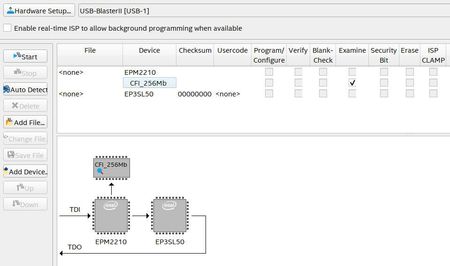
I'd like to examine a CFI device and save data (POF or HEX) by command line like for chain device.
c:\intelFPGA_pro\18.1\qprogrammer\bin64\quartus_pgm -c "USB-BlasterII [USB-1]" -m JTAG -o...

FakhrulA_altera Regular Contributor
3 years agoRegular ContributorHi leonidK,
I noticed that you are using Quartus 18.1. Based on the information I received internally, there is an issue in the CFI flash examination using the command line in 18.1.
In 18.1, the programmer is able to execute the examine operation but it didn't save the examined data into a POF file.
In 19.1, we fixed the issue where the programmer will automatically save the examined data into a POF file with default name of flash_examine.pof after the examine operation is completed. Hence, I would advise you to use Quartus 19.1.
Regards,
Fakhrul

leonidKNew Contributor
3 years agoNew ContributorThank you.
I'll try it.


