Forum Discussion

 New Contributor
Aria V Display Port core sometimes disconnected

 Regular Contributor
Hi,
There are a lot of design changes that you made. It's hard for me to comment whether everything is done correctly or not.
- The goal is we want to stay as close as to original example design with min changes
- I noticed you changes the DP Rx link rate and pixel output mode.
- Actually it's fine to stay with default setting due to you are using example design and you don't need to worry about the clock frequency changes. DP link training will just down train from 5.4G to 1.62G
- But now you need to watch out on all the clock frequency that you supply to DP design.
- Pls revert back to match original DP example design if you still encounter failure in hardware testing later
Regarding the MSA log dump
- Sorry, my bad. I miss out one step.
- In NIOSII shell terminal, type nios2-terminal to enter NIOS console first
- Then press "s" to print MSA log
Thanks.
Regards,
dlim
 relsaar5 years ago
Hi,
all of the changes I made to the example design were mandatory:
1. we have no 100M clock available on the board so I had to generate one with current PLL also our DP ref clock is derived from 162MHz so I had to change it as well.
2. the DP Aux channel should be Bidirectional and since our board has no such external IC I had to add it to the example design (unless the Aux channel can be entirely removed some how??)
3. our board has only one lane of Rx DP so I cancel all other lanes - I can add it back but I see no point.
I can revert back to 5.4G if you think it may help.
I'm not sure what did you mean by:
- But now you need to watch out on all the clock frequency that you supply to DP design.
Please explain
I tried to get a BER report from the NIOS command shell by typing nios2-terminal as you suggested but then the command line was locked to further typing (please see attached image) I verify the USB bluster is detected properly in the device manager (please see attached image)
Please advise how can we proceed?
Thanks
Ariel
- relsaar5 years ago
Hi,
I got some assistent from a local SW FAE on how to properly load the NIOS2 processor, however it did not work out on our boards.
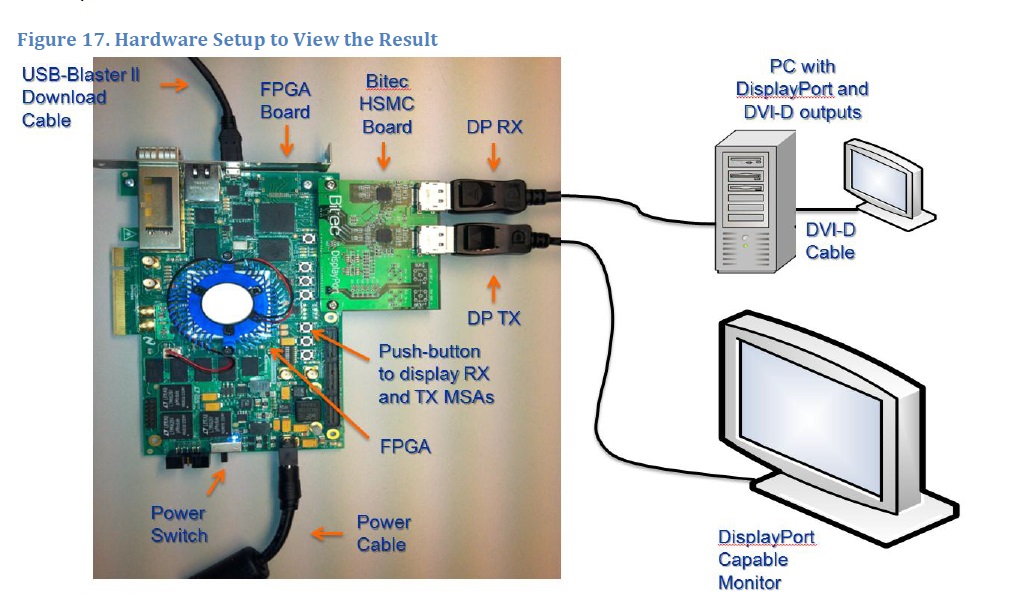
So I managed to get an Arria V evaluation board and a bitech doughter display port extender . I connected the evaluation board Rx to my docking display port output and the evaluation board Tx to my monitor(see photo).
When power up the board my windows 10 detect a new monitor on the display settings and during the SOF and .ELF load I got file transfer positive feedback (those werethe genuin files from the example design), however after I type: NIOS2-terminal I got no response and S or s command are not recognized then the new monitor detection was disappear. I also opened a secondary NIOS2 command shell to read NIOS messages but noting was printed. (see shell print capture)
Please advise how can we proceed?
Thanks
Ariel Saar