Forum Discussion

 New Contributor
A PMBUS error has occurred during configuration. Potential errors: Incorrect VID setting in Quartus
Hi,
I am getting the following error when I program the FPGA- on the Stratix 10 FPGA development system.
Device has stopped receiving configuration data
Error message received from device: External hardware access error. (Subcode 0x0032, Info 0x00040008, Location 0x00001800)
Detected a PMBUS error during configuration : Incorrect VID setting in Quartus Project. The target device fails to communicate to a smart regulator or PMBUS master on a board.
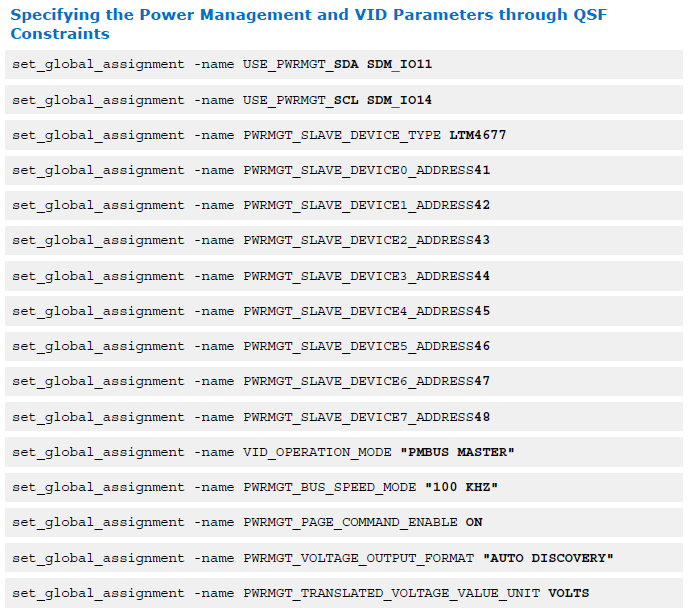
The VID settings I used are in the attachment.
Thanks in advance
--Rajeev
2 Replies
 rajeev_andesTech
Hi,
After changing the setting PWRMGT_SLAVE_DEVICE0_ADDRESS to 4F, I was able to successfully program the device.
Here are the final settings.
set_global_assignment -name USE_PWRMGT_SCL SDM_IO14
set_global_assignment -name USE_PWRMGT_SDA SDM_IO11
set_global_assignment -name PWRMGT_PAGE_COMMAND_ENABLE OFF
set_global_assignment -name VID_OPERATION_MODE "PMBUS MASTER"
set_global_assignment -name PWRMGT_DEVICE_ADDRESS_IN_PMBUS_SLAVE_MODE 00set_global_assignment -name PWRMGT_SLAVE_DEVICE0_ADDRESS 4F
set_global_assignment -name PWRMGT_SLAVE_DEVICE1_ADDRESS 00
set_global_assignment -name PWRMGT_SLAVE_DEVICE2_ADDRESS 00
set_global_assignment -name PWRMGT_SLAVE_DEVICE3_ADDRESS 00
set_global_assignment -name PWRMGT_SLAVE_DEVICE4_ADDRESS 00
set_global_assignment -name PWRMGT_SLAVE_DEVICE5_ADDRESS 00
set_global_assignment -name PWRMGT_SLAVE_DEVICE6_ADDRESS 00
set_global_assignment -name PWRMGT_SLAVE_DEVICE7_ADDRESS 00
set_global_assignment -name PWRMGT_BUS_SPEED_MODE "100 KHZ"
set_global_assignment -name PWRMGT_SLAVE_DEVICE_TYPE LTM4677 Ash_R_Altera
Regular Contributor
Hi,
Looks like that the issue is already resolved. Closing the case.
Regards