Forum Discussion

 New Contributor
Intel的PAC卡在开发过程中,使用remote signal tap进行时,在本地执行如下命令报错。
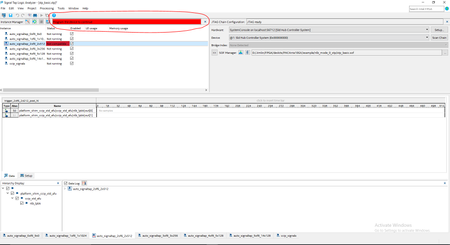

 Occasional Contributor
Hi JohnT,
In windows side, we did not download any sof via signaltap GUI. because that is not mentioned in the manual.
I was trying to duplicate the original example on 6.1 remote signal tap setup and use. but failed.
I put what I have done here for reference, maybe I miss out something.
we create project as below using filelist_mode_0_stp.txt
[root@fig01 nlb_mode_0_stp]# afu_synth_setup --source hw/rtl/filelist_mode_0_stp.txt build_synth
Copying build from /root/inteldevstack/a10_gx_pac_ias_1_2_pv/hw/lib/build...
Set OPAE_PLATFORM_FPGA_FAMILY to A10
Configuring Quartus build directory: build_synth/build
Loading platform database: /root/inteldevstack/a10_gx_pac_ias_1_2_pv/hw/lib/platform/platform_db/a10_gx_pac_hssi.json
Loading platform-params database: /usr/share/opae/platform/platform_db/platform_defaults.json
Loading AFU database: /usr/share/opae/platform/afu_top_ifc_db/ccip_std_afu_avalon_mm.json
Loading parent database: ccip_std_afu
Loading AFU database: /usr/share/opae/platform/afu_top_ifc_db/ccip_std_afu.json
Writing platform/platform_afu_top_config.vh
Writing platform/platform_if_addenda.qsf
Writing ../hw/afu_json_info.vh
[root@fig01 nlb_mode_0_stp]#
Open Quartus as below
[root@fig01 nlb_mode_0_stp]# cd build_synth/build
[root@fig01 build]# quartus dcp.qpf
Once the Intel Quartus Prime Pro Edition GUI opens, open the dcp.qpf project file
Click assignment->Revisions->new revisions-> create a new revision afu_dev based in the revioson afu_synth and the afu_dev will automatically being set up as current version
Quartus GUI->Processing->Start->Start Analysis & Elaboration processing may take several minutes to finish without error
under Project Navigator,switch page from Hierarchy to Files and double click stp_basic.stp to check ,nothing wrong founded.
close the stp_basic.stp and you will be asked do you want to save your changes? click yes or no both are ok. Do you want to enable current signaltap file for the current project? click yes
Close Quartus
[root@fig01 build]# cd ..
[root@fig01 build_synth]# run.sh
project was be build successfully.
the last part of compilation is shared as below
Info (23030): Evaluation of Tcl script ./a10_partial_reconfig/report_timing.tcl was successful
Info: Quartus Prime TimeQuest Timing Analyzer was successful. 0 errors, 176 warnings
Info: Peak virtual memory: 5475 megabytes
Info: Processing ended: Fri Mar 6 14:10:23 2020
Info: Elapsed time: 00:01:07
Info: Total CPU time (on all processors): 00:02:03
Info (19538): Reading SDC files took 00:00:12 cumulatively in this process.
Wrote nlb_400.gbs
===========================================================================
PR AFU compilation complete
AFU gbs file is 'nlb_400.gbs'
Design meets timing
===========================================================================
[root@fig01 build_synth]#
one thing I am quite confused was this compilation updated nlb_400.gbs file , i thought it should regenerate $OPAE_PLATFORM_ROOT/hw/samples/nlb_mode_0_stp/bin/nlb_mode_0_stp.gbs , but not.
and I have checked the nlb_mode_0_stp.gbs, and found that file was be updated based on modified time.
in linux side, we did like below
[root@fig01 build_synth]# sudo fpgaconf -B 0XD8 -D 00 -F 00 $OPAE_PLATFORM_ROOT/hw/samples/nlb_mode_0_stp/bin/nlb_mode_0_stp.gbs
[root@fig01 build_synth]# sudo mmlink -P 3333 -B 0XD8
------- Command line Input START ----
Bus : 216
Device : -1
Function : -1
Socket-id : -1
Port : 3333
IP address : 0.0.0.0
------- Command line Input END ----
PORT Resource found.
Remote STP : Assert Reset
Remote STP : De-Assert Reset
Read signature value 53797343 to hw
Read version value 1 to hw
Read write fifo capacity value 32 to hw
m_listen: 4
listening on ip: 0.0.0.0; port: 3333
in windows side, we did like below
cmd
cd D:\Jimlin\FPGA\devkits\PACArria10GX\example\nlb_mode_0_stp
D:\Jimlin\FPGA\devkits\PACArria10GX\example\nlb_mode_0_stp>system-console --rc_script=mmlink_setup_profiled.tcl remote_debug.sof 192.168.111.210 3333
and then we see the system-console GUI will launch and communicate with debug target until it print Remote system ready.
same time I could see new text kept updating from LINUX terminal side,seems handshake communication between host and target was success.
then we open stp_basic.stp was able to choose “System Console on … Sld Hub Controller System and jtag is reday.but keep asking me to program device to continue as in the firt picture.
also there is warning
Error(261009): Cannot run Signal Tap Logic Analyzer. Signal Tap File is not compatible with the file programmed in your device. The expected compatibility checksum value is 0x76AF59AF; the value read from your device is 0x9DDC57FD
hope this can give you a whole picture .
any other thing we can try ,please let me know
thanks
Jim

