Forum Discussion

HGuer2 New Contributor
7 years agoNew ContributorGenerated code by Intel HLS does not work
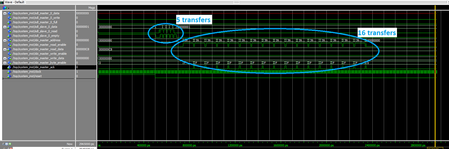
I have the following code: hls_always_run_component void Target00(ihc::mm_master<word4_t,ihc::aspace<7>, ihc::awidth<32>, ihc::dwidth<32>, ihc::latency<0>, ihc::waitrequest<true> >& device_5, ihc::...
 7 years ago
Hi,
The problem was with the avalon_mm_adapter. @HGuer2 will confirm that the message I sent him fixes the issue.
Sincerely

HGuer2New Contributor
7 years agoNew ContributorSorry for the missing file. I have attached it (with additional testbench files)
To run the simulation, I have done the following:
- Create an empty folder (i.e., C:\testbench)
- Launch "ModelSim - Intel FPGA Starter Edition"
- Within ModelSim, create a new project (inside the folder of step 1)
- Add all HLD (*.sv, *.v and *.vhdl) from from the generated Intel HLS project. Use the "Add Existing FIle" option and add the files located inside the following directories:
- hls\Target00\Target00.prj\components\%kernel%\*
- hls\Target00\Target00.prj\components\%kernel%\ip\*
- hls\Target00\Target00.prj\components\%kernel%\windows64\lib\dspba\Libraries\vhdl\base\*
- Also add the testbench files (see attached zip)
- avalon_mm_adapter.vhd
- Target00_top.vhd
- top.vhd
- In the project tab, select all Verilog files and:
- Right-click and select "Properties"
- Click on the "Verilog & SystemVerilog" tab and select "Use SystemVerilog" for the "Language Syntax" option.
- Generate the compile order by selecting "Compile" and "Compile Order" in the tool bar. Then click "Auto Generate"
- Launch the simulation with the following command vsim -gui -L altera_ver -L lpm_ver -L sgate_ver -L altera_mf_ver -L altera_lnsim_ver -L cyclonev_ver -L altera -L lpm -L sgate -L altera_mf -L altera_lnsim work.top
- Add the required signals add wave -position end sim:/top/system_inst/*
- Start the simulation with the run command for about 2000 ns

