User Profile

mevenson
 New Contributor
Joined 1 year ago


User Widgets
Contributions
Re: MegaWizard Plug in Manager GUI ipdate for Windows 11
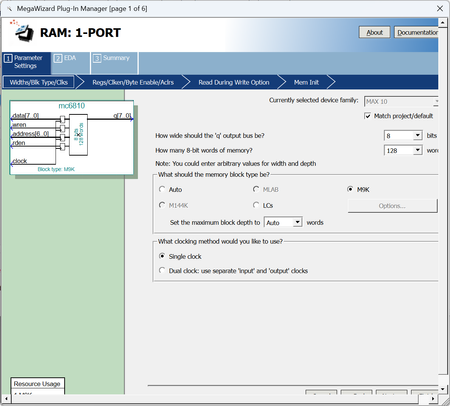
Frank, Thanks for responding. What specifically do you not understand about the comments I made? In my initial post, I show a screen shot of the windows after it opened and it clearly shows that the vertical size of the window is not large enough to display the buttons on the bottom of the window without resizing. My screen resolution is 3840 X 2160 on a 28" BENQ monitor with the scaling factor set to 150%. When I set the scaling factor to 100%, it has the same problem, so it is not scaling that is the issue. I realize that I can resize the window after it opens, but in a well designed GUI, I should not have to. My question to the developers of the wizard is - will this be fixed any time soon?822Views0likes0CommentsRe: MegaWizard Plug in Manager GUI ipdate for Windows 11
I am running Quartus Prime Version 24.1std0 Build 1077 03/04/2025 5C Lite Edition. When I click the About button in MegaWizard, it just gives me the Quartus Prime information. o are you telling me that to get a professional looking product, I have to pay for it. It seems unfair to charge for the tools to program the hardware on the development board. Is Altera not making enough money on the chips and development boards, that they have to charge again for the software to actually do anything with them?950Views0likes0CommentsMegaWizard Plug in Manager GUI ipdate for Windows 11
Are there any plans to fix the GUI interface for MegaWizard Plug in Manager so that the contents of the dialog fit in the dialog box without resizing. The 'Cancel', 'Back', 'Next' and 'Finish' buttons are off the screen - You can only see the tops of them. This makes the plugin look VERY unprofessional and annoying to use. What it looks like: What it should look like: Thank you for your attention to this matter. Michael Evenson <removed unnecessary links>1.3KViews0likes9Comments