User Profile

MViss4
 New Contributor
Joined 7 years ago


User Widgets
Contributions
Re: Nios II Software Build Tools for Eclipse (Quartus Prime 18.1) frequently crashing
I can confirm that the procedure described by 'TheRealNeil' is the same as I use and is indeed very annoying and would like to add after 2(!) years without any improvement in the tooling: the jtagserver.exe sometimes starts consuming significantly more memory (check with windows task manager/ Sysinternals Process Explorer) if this is the case it definitely has to be terminated and restarted to even have working debug session... The processes that might have to be terminated (depending on the crash) might be: nios2-elf-gdb.exe nios2-gdb-server.exe eclipse.exe eclipse-nios2.exe jtagserver.exe bash Here after I start the Programmer (Quartus) which will start the jtagserver.exe Here after 'Nios II Software Build Tools for Eclipse ' can be started for a hopefully successful debug iteration otherwise the whole termination/startup process needs to be done again For remote work it is not always possible to unplug the JTAG cable, as a workaround I have added this hub https://www.yepkit.com/product/300110/YKUSH3 so I can power cycle the blaster remote3.4KViews0likes0CommentsRe: Make dependencies not working for EDS with Quartus Prime Version 20.1.1 Standard Edition
Please note I have made case 00604188 in https://premiersupport.intel.com/ for this and it was confirmed that dependencies are not working. And a fix is scheduled for the next release of Quartus. Just for reference recently a colleague of mine has found a workaround as a rebuild is not really a sollution when you have to wait untill newlib is build which takes ~15min each time (with no build feedback!) Fix incremental build (ctrl-b) when header file is updated When a header file is updated the incremental build (ctrl-b) does not rebuild the objects that depend on the header file. So currently a clean + rebuild is needed. This can be fixed with the following changes in the Makefile: In the Makefile for the project search for "-include $(APP_DEPS)" and adapt this to: # Fix to always include Application dependency files # Include the dependency files unless the make goal is performing a clean # of the application. #ifeq ($(firstword $(MAKECMDGOALS)),) #ifeq ($(firstword $(MAKECMDGOALS)),app) -include $(APP_DEPS) #endif #endif In the Makefile for the project search for "define compile.c" and adapt this to: define compile.c @$(ECHO) Info: Compiling $< to $@@ @$(MKDIR) $(@D) $(CC) -MP -MMD -c $(APP_CPPFLAGS) $(APP_CFLAGS) -o $@ $< || (ret=$$?; rm -f $@ $(@:.o=.d) && exit $$ret) @# Fix to correct paths in .d files @dos2unix -q $(@:.o=.d) @sed -e 's@[cC]:@/mnt/c@' -e 's@[dD]:@/mnt/d@' -e 's@\\@\/@g' -e 's@\/$$@\\@' -i $(@:.o=.d) $(CC_POST_PROCESS) endef In the Makefile for the project search for "define compile.cpp" and adapt this to: define compile.cpp @$(ECHO) Info: Compiling $< to $@@ @$(MKDIR) $(@D) $(CXX) -MP -MMD -c $(APP_CPPFLAGS) $(APP_CXXFLAGS) $(APP_CFLAGS) -o $@ $< || (ret=$$?; rm -f $@ $(@:.o=.d) && exit $$ret) @# Fix to correct paths in .d files @dos2unix -q $(@:.o=.d) @sed -e 's@[cC]:@/mnt/c@' -e 's@[dD]:@/mnt/d@' -e 's@\\@\/@g' -e 's@\/$$@\\@' -i $(@:.o=.d) $(CXX_POST_PROCESS) endef In the Makefile for the project search for "define compile.cpp" and adapt this to: define compile.s @$(ECHO) Info: Assembling $< to $@@ @$(MKDIR) $(@D) $(AS) -MP -MMD -c $(APP_CPPFLAGS) $(APP_CFLAGS) $(APP_ASFLAGS) -o $@ $< || (ret=$$?; rm -f $@ $(@:.o=.d) && exit $$ret) @# Fix to correct paths in .d files @dos2unix -q $(@:.o=.d) @sed -e 's@[cC]:@/mnt/c@' -e 's@[dD]:@/mnt/d@' -e 's@\\@\/@g' -e 's@\/$$@\\@' -i $(@:.o=.d) $(AS_POST_PROCESS) endef The -include $(APP_DEPS) command is never included due to the nested (wrong?) ifeq statements "|| (ret=$$?; rm -f $@ $(@:.o=.d) && exit $$ret)" removes .o and .d file if gcc compiler returns with an error The sed command converts the windows paths in the .d file to WSL path notation (e.g. C:\path\to\file is replaced by /mnt/c/path/to/file) Warning: the sed command currently only supports C and D drives.2KViews0likes1CommentMake dependencies not working for EDS with Quartus Prime Version 20.1.1 Standard Edition
When building a new Nios II application the make dependencies are not working correct. This means that when changing a header file not all related .c files are compiled. Causing incorrect software! I have attached an example project which demonstrates this: main.c calls a printf: printf("Hello World %d\n",TEST2); Thus main.c depends on test2.h for the macro TEST2 main.c calls function myfunc() which is implemented in test2.c and calls a printf: printf("Hello World %d\n",TEST2); Thus test2.c is also depending on test2.h for the macro TEST2 When changing the value of macro TEST2 in test2.h and saving the file and hereafter building the project does NOT recompile main.c and test2.c! Thus the Make dependecies are not handled correctly and when examining the obj/main.d and obj/test2.d dependency files it can be seen that both files depend on test2.h! Some how in the make process the dependecy files are not correct generated or interpreted Causing incorect code which can only be corrected by doing a clean an full rebuild! Environment used: Quartus Prime Version 20.1.1 Build 720 11/11/2020 SJ Standard Edition WSL 1 - Ubuntu 18.04 LTS - GNU Make 4.1 Built for x86_64-pc-linux-gnu Windows 10 version 1903 (OS Build 18362.1256) Eclipse Version: Mars.2 Release (4.5.2) Build id: 20160218-06002.2KViews0likes5CommentsRe: Nios II Software Build Tools for Eclipse (Quartus Prime 18.1) frequently crashing
Hi Isaac, The issues has been persistent for years now on our department with more developers experiencing this issue.It appears with: Quartus 10.1sp1/11.0sp1/12.1/17.1/ 18.1/19.3/19.4. Windows 7, Windows 10 USB-Blaster Rev C., USB-Blaster II and Ethernet Blaster II. NIOS II/e or NIOS II/f It is common knowledge on our department and what we think that it might be vague related to using too many 'printf' calls with the jtag_uart_0. It is very annoying and only occurs during debug phase with Eclipse. I/we have worked on many PC's and different workspaces, different projects(thus different NIOS II applications but always the same crashing eclipse during debugging. I got a bit tired/frustrated of this and thought why not ask on the forum. I don't think your suggestions help since I have just a fresh Win10 installation for 2 months and on my old Win7 machine the same problem occurs. Do the developers of the NIOS II SBT ever try to debug under windows with using 'printf' calls? I can't imagine that they never seen this problem.4KViews0likes0CommentsNios II Software Build Tools for Eclipse (Quartus Prime 18.1) frequently crashing
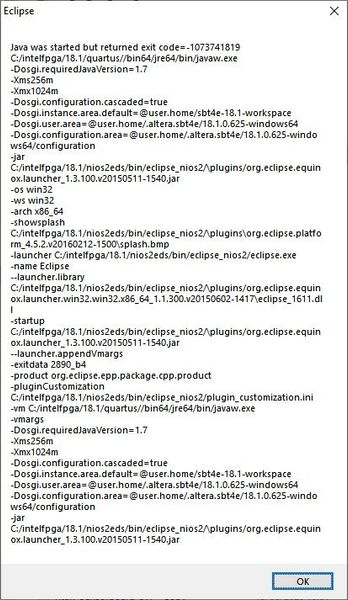
When debugging a project through the "debug" or "run" option eclipse frequently crashes. Find below 2 examples of the screens which appear when eclipse crashes. This is really annoying as you also manually have to kill the nios2-elf-gd.exe task as this keeps running. And makes developing really unstable. Is there any solution to this, any other users also experiencing this?4.1KViews0likes5CommentsRe: New application creation failure in NIOS II - Quartus20.1
Note in 19.4 when opening an 'Nios II Command Shell (Quartus Prime Pro 19.4)' command shell and running 'nios2-bsp-create-settings' results in "nios2-bsp-create-settings: command not found". However running 'nios2-bsp-create-settings.exe' (with .exe extension) does work. In the Makefile there is some logic for this: UNAME = $(shell uname -r) ifeq ($(findstring Microsoft,$(UNAME)),Microsoft) WINDOWS_EXE = .exe endif Refer to https://community.intel.com/t5/Nios-II-Embedded-Design-Suite/Error-s0-Error-during-execution-of-quot-C-intelfpga-20-1-quartus/td-p/1191914 as the uname is case dependent and only works for WSL1. Probably your 'nios2-bsp-create-settings' is executed without '.exe' extension you can try to adapt the Makefile to use a hardcoded ".exe" extension4.1KViews0likes0CommentsRe: .elf.srec not found
I came across the same problem in Quartus Prime Pro 19.4, while colleagues not. The difference for me might be I installed WSL2 but have set WSL 1 active. Workaround: as described added in my Makefile: # 1. During debug # -"wslpath: /mnt/d/Project/project.elf.srec: No such file or directory" # -"rm: cannot remove '/mnt/d/Project/project.elf.srec': No such file or directory" # -"Reading symbols from D:\Project\project.elf...(no debugging symbols found)...done." # 2. During build after debug was failed # -"nios2-elf-objdump.exe --disassemble --syms --all-header --source project.elf >project.objdump" # -"nios2-elf-objdump.exe: can't disassemble for architecture UNKNOWN!" # # When startin a debug session the project.elf.srec is generated this failes, and as a result the content of project.elf is overwritten with the content of this srec file # Causing the 'no debugging symbols found'/'can't disassemble for architecture UNKNOWN!' (hence the file is essientially a srec file with an .elf extension) # by manually making an project.elf.srec file this can be overcomed BUILD_PRE_PROCESS := touch $(ELF).srec6.7KViews4likes3Comments