User Profile

bonelli
 New Contributor
Joined 5 years ago


User Widgets
Contributions
Re: Error (209034): Can't find JTAG Server + jtagserver.exe dead
Thanks for the tip about the digital signature, I have previously faced this issue. I did solve it using the dirty solution (bypassing the windows signature verification). I can program a lot of devices with my version of software/hardware so I think the driver is working well. The question was why programming an EKP file (and only ekp) kills the jtag server. Re-reading the AN556, I found: The .ekp file has different formats, depending on the hardware and system used for programming. There are three file formats supported by the Intel Quartus Prime software: • JAM Byte Code (.jbc) file • JAM™ Standard Test and Programming Language (STAPL) Format (.jam) file • Serial Vector Format (.svf) file Only the .ekp file type is generated automatically from the Intel Quartus Prime software. You must create the .jam and .svf files using the Intel Quartus Prime software if these files are required in the key programming So I tried to generated a jam file and program it. Everything works fine now. This topic can be closed.1.3KViews0likes0CommentsError (209034): Can't find JTAG Server + jtagserver.exe dead
Hello, Using Win 10, Quartus 20.1, USB blaster and arria 10 device. - I can program a pof file in the flash device (AS mode) - I can to program a sof file in the fpga (JTAG mode) - I can NOT program an ekp file in the fpga (JTAG mode) I have also tried with the command line tool, result is the same : windows pops up "jtagserver.exe" is dead and the console shows: Error (209034): Can't find JTAG Server Error (209053): Unexpected error in JTAG server -- error code 44 Error (209053): Unexpected error in JTAG server -- error code 33 Error (209012): Operation failed The required box in the options is checked. Updating the USB driver (was already the latest one) did not solve the issue. Any help appreciated 🙂 Many thanks1.4KViews0likes3CommentsGenerating encrypted bitstream
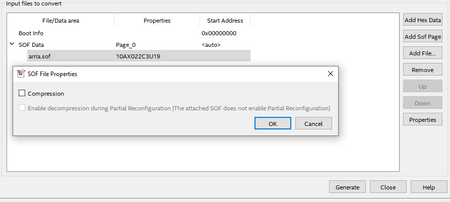
Hello, My board is using Arria 10 + MT25QU256 (ASx4 mode). I'm using Quartus 20.1, standard licence. I'm carefully following this topic https://www.intel.com/content/www/us/en/programmable/documentation/bhc1410500804155.html#bhc1410500756183 But at step 7.i, there is no " Bitstream Encryption" dialog box and no "Generate encrypted bitstream" available but only an option for compression. Also, what should be indicated for "programming file type"? None of jbc, jam, svf or ekp file formats are available. Any help appreciated Kind regards1.3KViews0likes7CommentsRe: Arria 10 VCCLSENSE max voltage
Yesterday I removed the connection between VCCLSENSE and the 1.8V power plane. The power consumed on 1.8V was still huge. Using the early power estimator: 0.9V (Vcc + Vccp + Vcceram): epe 524mA, measured 211mA 1.8V (Vcch_gxbl + Vccpt + Vccpgm + Vccbat + vcca_pll + vccio): epe 110mA (measured 461mA) This is the static power with no clock, unconfigured device. I tried to configure the FPGA and 1- It works 🙂 2- The measured static power consumption tends to the theoretical values : [email protected] (epe 524mA) [email protected] (epe110mA) This is still quite high on the 1.8V rail. The epe is computing the static power for a configured device. I did not found any information about the unconfigured power consumption, which looks to be very high on some power rails.1.3KViews0likes0CommentsArria 10 VCCLSENSE max voltage
Hello, I have just received my Arria 10AX board from my PCB manufacturer. I have 2 regulators (0.9V, 1.8V) for core and Vccio. The Vccio rail consume a lot of power, I'm looking for a hardware problem. The VCCLSENSE input pin is connected to the 1.8V rail instead of the 0.9V rail. This is not good, but can it explains the over-consumption or should I investigate for other errors? Thank you.1.3KViews0likes3Comments