User Profile

robertzab
 New Contributor
Joined 5 years ago


User Widgets
Contributions
Re: JESD240B - No license
Hi, I am currently in the testing phase on the EVK with the ADC converter, and I assumed that this IP would work in Evaluation Mode with JTAG connected, as it always did before. Previously, with the Arria 10 GX, this was exactly how I worked — testing with JTAG connected, and once everything was confirmed to be working properly, the license was purchased. Has anything changed in this regard?69Views0likes1CommentJESD240B - No license
Hi, I am running the ADC on the Arrow DevKit – Agilex 5 E-Series AXE5 Eagle Development Platform. The converter is the EVAL-AD9695, which uses the JESD204B interface. I initially used ‘Generate Example Design’ and then adapted it for this converter. However, after making the changes and assigning the pins, I wanted to generate the final output file, but I encountered the following license error: On the licensing page, I do not see any entry for JESD204B anywhere. “What can I do to test the design? I previously worked with the Arria 10 GX, and I did not have such problems there.171Views0likes5CommentsAgilex 5 – Critical HSSI Error in JESD204B Example Design
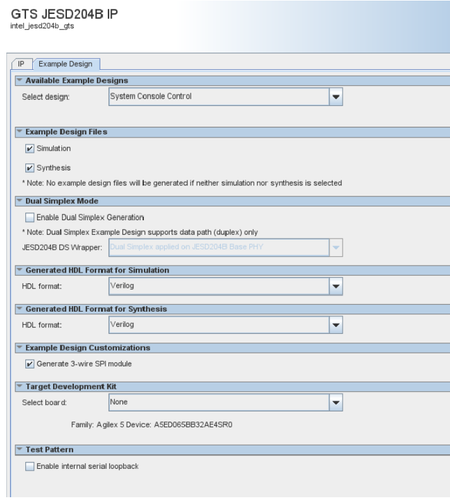
Hi, I am bringing up the JESD204B interface on the dev kit. For this, I used the "Generate Example Design" option with the following parameters: When I generate the project and start synthesis, it reaches the "HSSI Support Logic Generation" stage, and Quartus reports the following critical error: It turns out that the generated file contains an inconsistency in the generated HSSI metadata. My fix was to replace the entry in: The problem is that after updating the Qsys file, it gets changed back to intel_jesd_RX, and HSSI reports the critical error again. If there is already a fix or workaround for this issue, please let me know. For now, I added a simple script that I run from PowerShell: that replaces this value with the correct one:102Views0likes3CommentsRe: Agilex 5 FPGA E-Series 065B Modular Development Kit - PINOUT Bank 6E, 6G, 6F, 6H
I based it on the schematics from the development kit. I was surprised when Quartus showed an error that it couldn’t assign that pin — because it doesn’t physically exist :). Oh well, I consider the thread closed 🙂278Views0likes0CommentsAgilex 5 FPGA E-Series 065B Modular Development Kit - PINOUT Bank 6E, 6G, 6F, 6H
Hi, I have an Agilex™ 5 FPGA E-Series 065B Modular Development Kit, and I also created a project in which I intended to use pins from banks 6E, 6G, 6F, and 6H. However, when I open Quartus and the Pin Planner, all the pins from these banks are shown as No Connect. I generated an I/O Banks report for the device A5ED065BB32AE4SR0, and these banks are not listed. I am a bit confused because in the DevKit schematics, the IOs from these banks are routed, and the documentation on the website states that they can be used as HVIO. Could you please clarify what is the status of these banks? Are they perhaps intended for migration to higher devices, such as Agilex 7? Bert Regards, RobertSolved552Views0likes2CommentsAgilex5 FPGA Programming
Hi, I have an unusual question. Is the Quartus Programmer and Tools module available on macOS? Also, does the Quartus Programmer and Tools module require any kind of license if we would like to install it on every production device? My questions are related to the fact that our production device with Agilex5 will be transferring large amounts of data to a PC, and I was considering solutions for updating and programming the FPGA flash via JTAG. I was thinking about using quartus_pgm. Or is there a C script available for programming the SDM flash via JTAG? My hardware connection is as follows: PC → FX20 (USB Controller) → FPGA JTAG → SDM Flash Alternatively, if the Quartus Programmer and Tools module were available on macOS, the connection would be: PC → USB HUB → FPGA JTAG → SDM Flash. Can I count on an answer or some suggestion if this is the correct approach? Best Regards, RobertSolved576Views0likes3CommentsRe: Agilex 5 - PCIe
Hi, When I initially saw in your documentation that there was information about changing the BIOS setting from “AUTO” to the appropriate standard, I changed it immediately, but unfortunately I got the same error. Unfortunately, I’ve had a problem with the DevKit (MK-A5E065BB32AES1) right from the start—I even started a thread on the forum about it: https://community.intel.com/t5/FPGA-SoC-And-CPLD-Boards-And/Problem-DevKit-Agilex-5-MK-A5E065BB32AES1/m-p/1675889#M29564 And from the Arrow distributor, I received their startup kit: https://www.arrow.com/en/research-and-events/articles/new-intel-arrow-axe5-eagle-fpga-dev-kit-discover-the-molex-interconnects I’m currently working on that one. I’ll try to check it on a different host as well. By the way, do you have any Windows drivers?2.1KViews0likes1CommentRe: Agilex 5 - PCIe
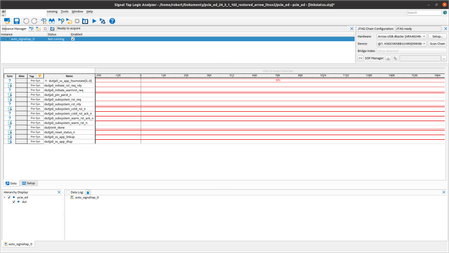
Thank you for your response. I’ve reviewed the documents and followed everything according to the documentation. As I mentioned in my previous message – the system sees the device and has theoretically negotiated the link. Below is also a screenshot from SignalTap: I'm also including the "Event Counter" tab from the console: To be honest, I’m not sure where the issue is.2.2KViews0likes2Comments