Forum Discussion

 New Contributor
Please help: Operation Failed when programming FPGA using .pof file

 Contributor
Hi Envirosweet,
Thanks for trying configuration with Programmer 19.1. Then the situation may not be the same as the Knowledge Database mentioned.
I got a few questions:
1, When you mentioned the "jig", do you refer to JTAG cable? Or what are you referring to?
2, How many 10M04 device have you used? Does this issue happen to all the MAX 10 FPGA devices?
3, Is the FPGA on an Intel FPGA devkit or on a board designed by yourself?
Thanks & Regards,
Xiaoyan
ContributorHi Envirosweet,
Added a few suggestions.
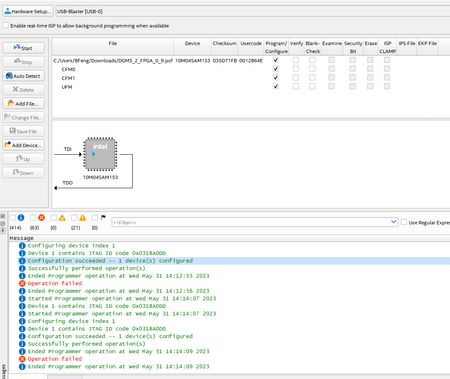
1, You may also try to decrease the "Hardware frequency" to 1/2 or 1/4 of the default value. Sometimes it works after frequency decreasing. Click the "Hardware Setup", and then you can see this window.
2, To double check if the KDB article works, you may also try if .jbc file works in Programmer 19.1 as the article mentioned. Try generating a .pof-equivalent file according to chapter 3.2.1 in MAX 10 Configuration User Guide. https://www.intel.com/content/www/us/en/docs/programmable/683865/current/auto-generating-configuration-files.html
3, If decreasing the hardware frequency and .JBC file also don't work, check if the options in "Device and Pin Options" are default. If still does not work in default settings, we may suspect the internal FLASH issue and we may consider do tests to check if FLASH does not work.
Thanks & Regards,
Xiaoyan
 Envirosweet3 years ago
Hi Xiaoyan,
Deeply appreciate the time you've taken to assist me with this problem.
The problem has been resolved. It's due to my stupid mistake didn't put one of the RX switch on my own test jig connected to JTAG.
However, before I found my mistake, I tried the .jbc file, it actually worked and got my FPGA programmed for some reason.
Thanks again for all your help and time.
Sincerely,
Envirosweet

