Forum Discussion

Altera_Forum Honored Contributor
10 years agoHonored ContributorAltera License File generated versus license expiration date
I received via e-mail a 1-F5MLFN_License.dat license file.
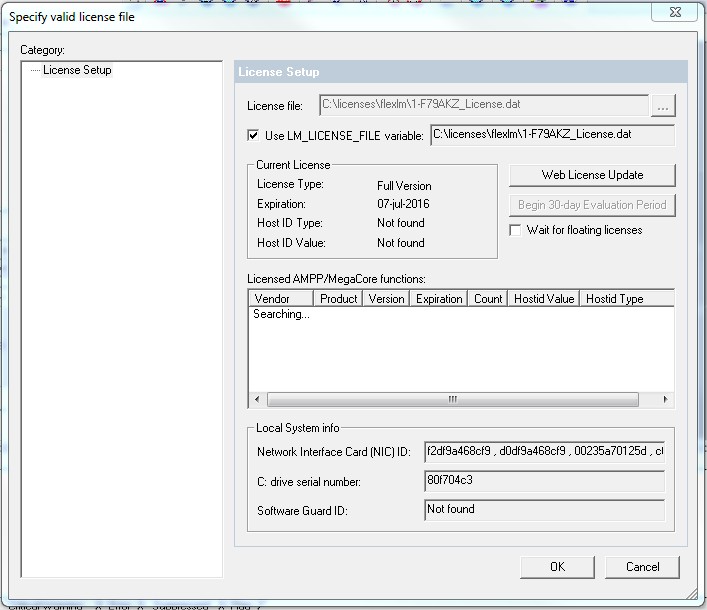
According to the instructions of the e-mail, I put it in the recommended folder: C:\licenses\flexlm After this I opened 9.1 (non-web free) Quartus II and selected Tools -> License Set Up to input the path and filename of the license file. My problem is that in the "Current License" info it tells me an expiration date of 07-jul-2016 but opening the .dat file, the header indicates "# - License Expires 20-Jun-2026" And now I can´t compile files because the license file is expired. Additional information: 1) turning on or off the "Wait for floating licenses" causes the same effect (still shows a license expired warning) 2) My License Self Service Center shows the following info: Quartus II SE Float for University Program / 2026-06-30 University License NIOS II Soft Processor MegaCore / 2026-06-30 How can I fix this? Sorry if this question is already addressed2 Replies
 Altera_Forum
Thank you bert_alse,
but your recommended actions did not fix the problem. I tried another action. Here is the description of it. I opened the Self Service Licensing Center and clicked on the "Get License" button in the "Computers and License Files" tab. After a few moments I received via e-mail another license, but such file presented the same expired date: 07-jul-2016 (see attached image). Setting the environment variable or not, the same expired date is presented. My License Type is perpetual and, as I already mentioned, my maintenace date is 2026. I understood that such information would guarantee for me that I could receive and use a license for a considerable period of time. But it seems to me that this license that I received had a same valid period as a tryal version. I can´t proceed with my work because my development kit is a Nios 2 Stratix II, which is a not installed device for Quartus 2 9.1 sp2 web-free version. Due to this fact I need the non-free 9.1 sp2 version. How can I fix this license problem?- Altera_Forum
Tools > License setup
Inside the "License file" box : make sure the path to your license file is added here. when you press <tab>, you should see the features that are in your license file. (you can also update the LM_LICENSE_FILE variable)