User Profile

TienfongC_Altera
 New Contributor
Joined 1 year ago


User Widgets
Contributions
Re: Eclipse-->Run-->Run Configuration doesn't burn elf to ROM in NIOS II
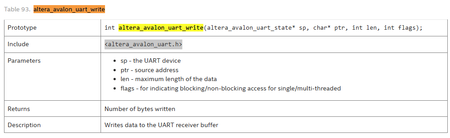
Answer for 1 and 3 .sopcinfo file does contain all IP base addresses and other configuration details (like IRQ, width, type, etc.) used in your Platform Designer system. These addresses are used by the Nios II HAL and BSP to generate C headers like system.h. Specifically: system.h uses .sopcinfo to define macros like #define MY_IP_BASE 0x00081100 The BSP tool parses .sopcinfo to generate device driver stubs and address definitions For automated driver access, always include #include "system.h" in your Nios II C code. Example for adding multiple UARTs in Platform Designer and generate the BSP, each UART will have its own macro name in system.h, like: #define UART_0_BASE ... #define UART_1_BASE ... #define UART_2_BASE ... To use each UART explicitly: 1. For printf() Set one UART as the STDOUT device in BSP Editor or settings.bsp: #define ALT_STDOUT_UART_NAME "uart_0" 2. For communication or custom access Use HAL API functions with explicit base addresses: #include "altera_avalon_uart.h" #include "system.h" altera_avalon_uart_write(UART_1_BASE, 'A'); char c = altera_avalon_uart_read(UART_2_BASE, 0, &status); You must manually manage which UART is used for which purpose by assigning consistent names (uart_for_jtag, uart_for_mcu, etc.) and referencing the correct *_BASE and *_IRQ macros Answer for 2 In Platform Designer the pll_slave port on the ALTPLL IP is simply its Avalon‑MM “control/status register” interface. It lets Nios II read and write the PLL’s configuration and status registers at run‑time (e.g. to tweak phase, reconfigure frequencies, or poll the “locked” bit). When you do not need to hook up pll_slave Static, compile‑time configuration: If you’re happy with the PLL settings you picked in the megafunction GUI (or tcl script) and you never intend to change them in software, you can leave pll_slave unconnected. The FPGA will still configure the PLL exactly as you specified before you even boot Nios II. No driver/library support: If you don’t plan on writing C code to poke the PLL’s registers (or you’re not going to use Altera’s ALTPLL_RECONFIG API), it’s dead weight. When you should connect pll_slave Dynamic reconfiguration: If you want your Nios II code to call into Altera’s PLL‑reconfig library (for example, the altpll_reconfig BSP component) to adjust the output frequency or phase on the fly, you must wire pll_slave up to your system bus: In Platform Designer, connect pll_slave to your Nios II’s data_master (and/or to the same interconnect as your other CSR ports). Export its base address (double‑click its port on the “Export” column) so that system.h sees something like #define ALTPLL_SLAVE_BASE 0x...?. Then in C you can use the reconfig API e.g. #include "altera_pll_reconfig.h" ALT_PLL_RECONFIG_INSTANCE (my_pll, ALTPLL_SLAVE); altpll_init(&my_pll); // … later … altpll_reconfig(&my_pll, ALTPLL_RECONFIG_CMD_MHZ(100)); Status monitoring: Even if you never change frequencies, you might want to poll the PLL’s “locked” status bit to gate your system reset. That also requires the slave port. Bottom line: No—you can safely leave pll_slave unconnected if you only need a fixed PLL setting, and you aren’t going to touch it from software. Yes—wire it up to your Nios II’s Avalon-MM bus (and export its CSR address) if you plan to use the Altera PLL reconfiguration/status API in your C code. In the ALTPLL IP you see two “c” ports—c0 and c1—these are simply the PLL’s clock outputs. When you open the megafunction GUI you told it to generate up to N outputs (each can be a different frequency or phase), and they get named c0, c1, c2, … in the Qsys schematic. c0 is your first PLL output clock (often used as your main system clock) c1 is your second PLL output clock (maybe configured to a different frequency or phase) What to do with them: If you only need one clock domain Use c0 to drive all of your logic (for example connect c0 to the Nios II clk input). You can leave c1 un‑connected in Qsys—nothing bad happens. If you need multiple clock domains Wire c0 into the clk input of the modules you want at frequency/phase #0. Wire c1 into any other modules that need the second frequency/phase. Thanks.1.5KViews0likes2CommentsRe: Eclipse-->Run-->Run Configuration doesn't burn elf to ROM in NIOS II
Here’s an updated and streamlined guide for embedding a Nios II .elf into FPGA ROM, using Intel’s official elf2hex documentation (Doc 683282): Goal: Embed a Nios II application (ELF) into on-chip ROM on Cyclone 10, using a .hex file generated via elf2hex, as defined in Altera's current best practices. Required Tools: Quartus + Platform Designer (Qsys) Nios II Embedded Design Suite (EDS) elf2hex utility (part of Nios II EDS) Your compiled app.elf Step-by-Step Flow (Updated per Intel Doc 683282) 1. Build the ELF Compile your Nios II application normally (Debug or Release). Make sure the reset and exception vectors point to the on-chip ROM base address. Result: app.elf with code + debug info. 2. Use elf2hex to Generate Memory Init File bash CopyEdit elf2hex \ --input=app.elf \ --output=rom_init.hex \ --base=0x00000000 \ --end=0x00013FFF \ --width=32 \ --record-bytes=4 elf2hex \ --input=app.elf \ --output=rom_init.hex \ --base=0x00000000 \ --end=0x00013FFF \ --width=32 \ --record-bytes=4 Key flags explained (from Intel doc 683282): --input and --output: ELF in, HEX out --base/--end: match the ROM’s address range --width: memory data width (bits) --record-bytes: bytes per memory word (typically 4 for 32-bit) Note: Use correct ROM start address and size from Platform Designer. 3. Configure On-Chip ROM in Platform Designer Add On-Chip Memory (ROM) component. Set: Memory size: match ELF footprint (e.g. 80 KB) Data width: e.g. 32 bits Contents: enable and point to rom_init.hex Mode: ROM 4. Add to Quartus Project If using command line: Add meminit.qip (if using make mem_init_generate) Or manually: Add .hex to the memory IP via GUI Ensure it’s included in the Quartus project file list 5. Compile Design Run full Quartus compile 6. Program FPGA Use Quartus Programmer to flash the .sof or .jic to FPGA or configuration flash. Your program is now burned into ROM and runs at power-up. 7. Debug Using ELF (Optional) In Eclipse/Nios II Debug Config: Set ELF file Uncheck “Download ELF to target” Use JTAG to attach to running program You can still set breakpoints and inspect variables using debug symbols. Notes: elf2hex (Doc 683282) replaces older positional usage with long-option flags. If you have RAM for .data/.bss, ensure it’s initialized or writable. Avoid writing to ROM; it’s for code and read-only sections. Altera Reference: Full official elf2hex usage documentation (Doc ID 683282): 🔗https://www.intel.com/content/www/us/en/docs/programmable/6832821.6KViews0likes0Comments