User Profile

TiensungA_Altera
 Occasional Contributor
Joined 3 years ago


User Widgets
Contributions
Re: Stratix 10 HPS LED example
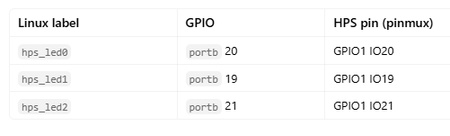
They got assigned based on the PINMUX selection where the user selects the peripherals to be enabled. Quartus will automatically, picked the IOs and assigned them respectively. As per the spec (if i am not mistaken), you can't assign HPS dedicated pin locations in pin planner because the package balls are fixed per device. You can only choose the function and mux as i explained above in the HPS Platform designer. Pin planner is basically for reviews only. Then, it will be translated to a handoff (part of the bitstream) for the HPS FSBL to then configure the PINMUX/IO manager. If you are looking for the GPIO for LEDs, they are as followed below. If you are using the GHRD official design, you can then, control the LEDs output through this IOs.90Views0likes1CommentRe: Agilex 5 Multiboot SPL Fails to Probe QSPI
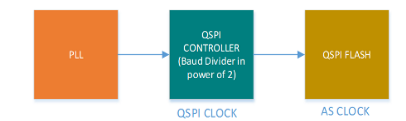
hi, You need to set the AS_CLK to a frequency less than 80MHz which is your NOR flash's max frequency. The 500MHz is the QSPI REF clock which is 4 times the AS_CLK. This is an internal design where the SDM chooses the REF clock based on your AS_CLK input. Try to pick another AS_CLK less than 80MHz in the Quartus GUI below.5Views0likes0CommentsRe: Agilex 5 Multiboot SPL Fails to Probe QSPI
A bit more information, i am not sure why UBOOT Proper and linux works for you. If the Frequency is wrong, it would have failed from the start. Can you dump your device tree for Linux here? The design is as follow so that you can debug this on your own. The SDM gets the AS_CLK from your QHIP platform designer setting The SDM calculates the QSPI REF clock , here 500MHz based on your 125MHz The FSBL UBOOT gets the QSPI REF Clock via mailbox as you saw. The FSBL writes the QSPI REF clock to scratch boot register which is later shared to the UBOOT Proper The UBOOT proper should still use 500MHz as the ref clock. The Kernel gets the 500MHz by running a script in UBOOT Proper CLI, which updates the Linux kernel's freq. SOCFPGA_AGILEX # fdt addr 0x8000000 Working FDT set to 8000000 SOCFPGA_AGILEX # run linux_qspi_enable SF: Detected mt25qu02g with page size 256 Bytes, erase size 64 KiB, total 256 MiB Enabling QSPI at Linux DTB... Working fdt: 08000000 QSPI clock frequency updated SOCFPGA_AGILEX # Can you place printf to determine why the spi flash probe fails? Can you print out the ref_clk_hz? I would like to see whether the UBOOT Proper uses a different ref clock than the UBOOT SPL. And, also to double confirm the ref freq used.4Views0likes0CommentsRe: Agilex 5 Multiboot SPL Fails to Probe QSPI
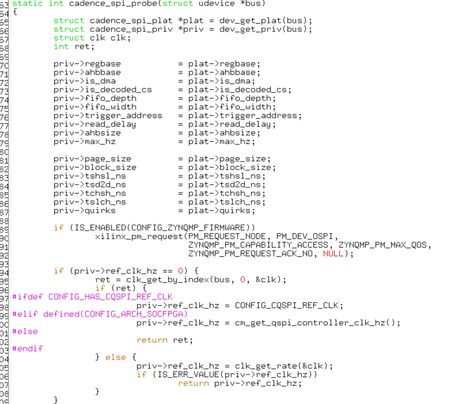
Thanks for the reply. Let us try to confirm a couple of things. I am not 100% sure why UBOOT Proper SPI probe works, and Linux works for you. Are you using the default GSRD/GHRD uboot.itb and kernel.itb from us without modification? The only change you did is the change of the NOR flash as compared to our GSRD? Did you then change the NOR flash type in the Uboot.itb Device tree and Linux device tree? What is your Linux kernel device tree? The GSRD linux kernel DT is as shown below and the UBOOT proper as well as the SPL UBOOT should use the same. Did you modify all of them to use the 32MB Nor flash? You can modify the AS_CLK here. More details below. The design is like this (This will help you to debug on your own): The SDM determines the QSPI CLOCK based on the requested AS_CLOCK. So, if your flash AS_CLOCK is a max of 80MHz, you can use anything up to that frequency. Let us say, we use 50MHz or anything less than the max of 80MHz from the dropdown menu of Quartus. The displayed QSPI reference clock seems to 500MHz on your end. Based on 500MHz, it is likely your AS_CLK is 125MHz which is higher than 80MHz. I am not 100% sure. The Quartus should tell you the highest possible AS_CLK frequency and only allow you to change to specific list of frequencies only. There is basically a 4:1 clock relation between the QSPI CLOCK and the AS_CLK. What AS_CLK did you use in the Quartus platform designer? Given the fact that Linux also works with the default spi max frequency of 400MHz based on your DTB info, i think 400MHz is the right frequency. QSPI ref clock is then, determined by SDM based on an internal clock table. It should be QSPI_CLOCK >= 4x AS_CLOCK. The SPL will then, get the QSPI_CLOCK from the SDM via mailbox. (in your case, this is 500MHz) The SPL writes the QSPI_CLOCK value into a scratch boot register COLD 0. The SSBL should read the contents of the scratch boot register COLD0 during spi probe to configure the QSPI controller The SSBL will also write into the environment variables. The env variable is for example, " qspi_clock=<0x17d78400>" The user can run a script at the UBOOT proper CLI to overwrite the Linux Device tree for QSPI clock frequency so, the Kernel gets the right clock frequency. Did you run this in your test? Example, SOCFPGA_AGILEX # fdt addr 0x8000000 Working FDT set to 8000000 SOCFPGA_AGILEX # run linux_qspi_enable SF: Detected mt25qu02g with page size 256 Bytes, erase size 64 KiB, total 256 MiB Enabling QSPI at Linux DTB... Working fdt: 08000000 QSPI clock frequency updated SOCFPGA_AGILEX # One thing I am not sure, is that, if the Frequency received by SDM is wrong, the UBOOT proper should also fail. Well even the SDM should fail to read the QSPI NOR flash and hence failing the HPS boot. But in your case it didn't. This is because during UBOOT proper spi probe, the frequency is fetched from the Scratch boot register cold0 using the cm_get_qspi_controller_clk_hz(). Could you add a printf here to find out what ref_clk_hz values you are using in UBOOT Proper versus UBOOT SPL for us to double confirm? In general, the root-cause is not very clear to me.1View0likes0CommentsRe: Agilex 5 Multiboot SPL Fails to Probe QSPI
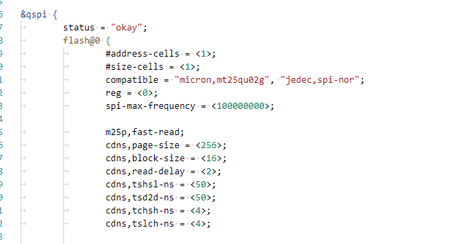
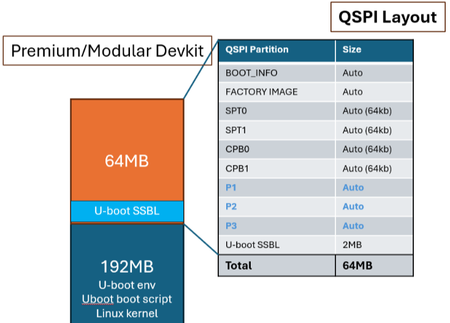
hi, I think your Device tree could be the culprit. It does not seem right. Let us go through the questions below. Can i seek clarification on your statement "So far I've been able to access QSPI from U-Boot and Linux."? Are you able to access QSPSI in UBOOT-proper (SSBL) and Linux ? The QSPI only failed during SPL RSU? I am a bit confuse here. Let me assume you did not actually see QSPI working on your target board. What board are you using? My assumption is a custom board. The NOR Flash you are using is only 32MB. " compatible = "micron,mt25qu256a", "jedec,spi-nor";" Your flash is a bit too small to support both RSU and QSPI boot for HPS. Is this the correct Flash device? Is your Device tree correct? Typically, the RSU takes up to 64MB (we could go lower if there is no need to support multiple RSU slots), and the remaining partitions cater to the HPS secondary boot images like SSBL UBOOT, Linux kernel and the Linux ROOTFS in UBIFS format. The SSBL UBOOT is of course a fixed address in the NOR flash so, the SPL could locate it during boot-up. The SSBL UBOOT address is CONFIG_SYS_SPI_U_BOOT_OFFS=0x04000000 (from UBOOT source, configs/socfpga_agilex5_defconfig) The partitions that we used for the Altera premium devkit is shown below. Of course this is just an example. You are free to change the partition but you may have to modify the Device tree and UBOOT config especially the U_BOOT offset address. Are you booting everything from QSPI NOR flash? Also the spi-max-frequency is different. Also, the Flash partition seems different too. Also, "QSPI: Reference clock at 500000 kHz" <- The QSPI clock is 500MHz which is different than the one in your DT. Is this correct? Is this your custom board? The official GSRD NOR flash is https://github.com/altera-fpga/u-boot-socfpga/blob/socfpga_v2025.10/arch/arm/dts/socfpga_agilex5_socdk.dts flash0: flash@0 { #address-cells = <1>; #size-cells = <1>; compatible = "mt25qu02g"; reg = <0>; spi-max-frequency = <100000000>; m25p,fast-read; cdns,page-size = <256>; cdns,block-size = <16>; cdns,read-delay = <1>; cdns,tshsl-ns = <50>; cdns,tsd2d-ns = <50>; cdns,tchsh-ns = <4>; cdns,tslch-ns = <4>;0Views0likes0CommentsRe: Routing PL DDR to PS
The link you posted is the ideal way to enable the external memory to HPS using the hard memory controller. However, you asked if the HPS could use the other external memory connected to the FPGA fabric. That is technically possible but not the recommended way. Hope this makes sense.96Views0likes2CommentsRe: To evaluate and monitor CPU frequency behavior in the Kernel OS
JamesG_Altera is 100% correct. Please follow James's suggestion on the UBOOT SSBL to modify the register (ping-pong counter/divider) or Quartus. This is the recommended solution. For the Linux part, I will just add a bit more information. We do not support setting the Clock rate through the clock manager driver in Linux yet. But customers are free to implement it if they want as this is open source. Hence, contributing to the open source community. If you are keen to try, then, i created some basic steps on how to do this in Linux below. Step 1: We need to define the Min, and max frequency or multiple operating frequencies for the CPU cores using the opp-table. I am just giving an example with some sample frequencies. We do not need to specify the operating voltage because the Agilex5 does not support it. We only support frequency scaling. As shown below, you have to add the DT bindings to the clock manager and define the device tree for opp-table. This is not the correct values. And it is only as a demostration. cpus { #address-cells = <1>; #size-cells = <0>; cpu0: cpu@0 { compatible = "arm,cortex-a55"; reg = <0x0>; device_type = "cpu"; enable-method = "psci"; next-level-cache = <&L2>; clocks = <&clkmgr AGILEX5_CORE0_FREE_CLK>; clock-names = "cpu"; operating-points-v2 = <&cpu_opp>; // cpufreq uses these }; cpu1: cpu@1 { compatible = "arm,cortex-a55"; reg = <0x100>; device_type = "cpu"; enable-method = "psci"; next-level-cache = <&L2>; clocks = <&clkmgr AGILEX5_CORE1_FREE_CLK>; clock-names = "cpu"; operating-points-v2 = <&cpu_opp>; // cpufreq uses these }; cpu2: cpu@2 { compatible = "arm,cortex-a76"; reg = <0x200>; device_type = "cpu"; enable-method = "psci"; next-level-cache = <&L2>; clocks = <&clkmgr AGILEX5_CORE2_FREE_CLK>; clock-names = "cpu"; operating-points-v2 = <&cpu_opp>; // cpufreq uses these }; cpu3: cpu@3 { compatible = "arm,cortex-a76"; reg = <0x300>; device_type = "cpu"; enable-method = "psci"; next-level-cache = <&L2>; clocks = <&clkmgr AGILEX5_CORE3_FREE_CLK>; clock-names = "cpu"; operating-points-v2 = <&cpu_opp>; // cpufreq uses these }; cpu_opp: opp-table { compatible = "operating-points-v2"; opp-shared; opp-min { opp-hz = /bits/ 64 <10000000>; // 10MHz }; opp-max { opp-hz = /bits/ 64 <800000000>;// Example, 800MHz }; }; Step 2: You have to modify the drivers\clk\socfpga\clk-periph-s10.c to add the 2 ops function for .set_rate and .round_rate. The following codes are just POC and not production quality. The objective is to modify the Ping pong counter. The spec says, that, "Division setting for ping pong counter in clock slice. Divides the core01_clk frequency by this value + 1." The reset value is 0, and the divisor is 1. It will take the maximum frequency of the CPU core. Intel Sundance Mesa HPS Register Map - core01ctr static int clk_cpu_set_rate(struct clk_hw *hw, unsigned long rate, unsigned long parent_rate) { struct socfpga_periph_clk *socfpgaclk = to_periph_clk(hw); unsigned long div = 1; if (socfpgaclk->hw.reg) { /* Calculate divisor */ div = (parent_rate/rate) + 1; // We need to obtain the right divisor based on the max clock frequency. The requested rate is assumed to be always smaller than the parent_rate (maximum core frequency) writel(div, socfpgaclk->hw.reg); pr_err("DEBUG: clk_cpu_set_rate %d parent= %d, divisor = %d\n", rate, parent_rate, div); } return clk_peri_cnt_clk_recalc_rate(hw, parent_rate); } // This is not implemented in full yet. Just for demo. static long clk_cpu_round_rate(struct clk_hw *hw, unsigned long rate, unsigned long *parent_rate) { return rate; } static const struct clk_ops peri_cnt_clk_ops = { .recalc_rate = clk_peri_cnt_clk_recalc_rate, .get_parent = clk_periclk_get_parent, .set_rate = clk_cpu_set_rate, // <- Define the new function here .round_rate = clk_cpu_round_rate // Define the new function here. }; Testing the solution. You should be able to see cpufreq once you have both Device tree and Device driver (clock manager) hacked. You must set the governor to user-space in order for you to modify the cpu frequency from sysFS. root@dhcp0:~# echo userspace > /sys/devices/system/cpu/cpu0/cpufreq/scaling_governor Modify the speed (in kHz) echo 50000 > /sys/devices/system/cpu/cpu0/cpufreq/scaling_setspeed root@dhcp0:~# ls /sys/devices/system/cpu/cpu0/cpufreq affected_cpus related_cpus scaling_governor cpuinfo_cur_freq scaling_available_frequencies scaling_max_freq cpuinfo_max_freq scaling_available_governors scaling_min_freq cpuinfo_min_freq scaling_cur_freq scaling_setspeed cpuinfo_transition_latency scaling_driver stats11Views0likes0CommentsRe: Routing PL DDR to PS
hi, Are you specifically asking to do the following? HPS CPU (ARM) <--AXI Bridge--> FPGA Interconnect <---> DDR Controller (in FPGA fabric) <---> DDR chips (physically connected to FPGA pins) If so, it could be possible to get the HPS CPU to access the DDR connected to the PL. We need to have some RTL magic/implementation to expose the memory controller interface in the FPGA as a slave memory device and then, configure the HPS to use it as the system memory. There lies many challenges that I can't confirm. We may have coherency issues (IO Cache coherency but the SCU anyways does not support IO Cache coherency from other initiators or DMA agents). And also performance issues like higher memory latencies. Since the memory interface is routed through the HPS to FPGA bridge, HPS running an OS like Linux which requires MMU and Cache enablement may run into coherency issues. UBOOT SPL or bare-metal running on HPS could run without enabling DCache/ICache. Having said that, if it is just the HPS CPU cores which relies on the SCU, this could be possible as the memory coherency between the cores are maintained by SCU and the cache managment may be fine. You will also have to ensure that, no other agents in FPGA or DMA devices writes to the DDR/memory (This could be solvable easily by SW intervention, SW cache coherency management). From a SW standpoint, you have to modify the UBOOT/Linux device tree to use the memory mapped addresses at the HPS to FPGA bridge. The FPGA has to be configured before starting the HPS. *Add-on on SW, the UBOOT SPL SDRAM device driver or module may need to be altered/hacked to bypasss the default drivers which runs the hard memory controller in A10. Else it will throw an error during boot-up if there are any. If no errors, you can ignore this. You need to ensure the PL/FPGA memory controller is up and in user-mode in the FSBL UBOOT SPL before it starts to load the secondary boot images to DDR. Memory map changes required for the arch\arm\boot\dts\intel\socfpga\socfpga_arria10_socdk.dtsi #include "socfpga_arria10.dtsi" / { model = "Altera SOCFPGA Arria 10"; compatible = "altr,socfpga-arria10-socdk", "altr,socfpga-arria10", "altr,socfpga"; aliases { ethernet0 = &gmac0; serial0 = &uart1; }; chosen { bootargs = "earlyprintk"; stdout-path = "serial0:115200n8"; }; memory@0 { name = "memory"; device_type = "memory"; reg = <0xC0000000 0x40000000>; /* 1GB <- Changed from 0x0 to 0xC0000000. The base address of the memory should be based on the FPGA fabric design where the slave memory device to DDR is at. And, you should use the SOC2FPGA bridge interface. */ }; This is the tentative reply to your question. A readily available workaround does not exist today as it may requires some POC or exploration by your team. We will consult more experts and if we have anything extra or corrections, we will reply later to this discussion thread. Thanks15Views0likes4CommentsRe: Operating system kernel-level FPGA bridge communication
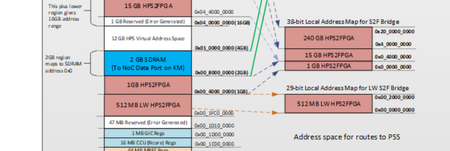
hi, By right, the devmem2 must be used to read/write to the HPS2FPGA bridge using the mapping below for Agilex5. I can see that your mapping is incorrect. If you are using the LW HPS2FPGa, it starts at 0x1FC0_0000. You do not need to create any nodes in the device tree. The nodes in the device tree are only required if you are writing/using SOFT IP Device drivers in Linux kernel to access the bridge. Without drivers and with user-space interface, you should be able to use devmem2. The bridges will be enabled by default if you do a FPGA configuration in Linux. If you perform this in U-boot, you will have to do a bridge enable in uboot before booting the Linux. The configs that you use above example, CONFIG_FPGA_BRIDGE and _REGION are only required if you are doing FPGA configuration in Linux as they are required by the FPGA manager device driver "stratix10_soc.ko" driver to configure the 2nd stage FPGA core.rbf. In short, the bridges should be enabled if you have configured the FPGA in UBOOT prior to loading Linux.72Views0likes0Comments