User Profile

kopdcom
 New Contributor
Joined 3 years ago


User Widgets
Contributions
Re: PROBLEM LOADING with MONITOR PROGRAM 18.1 TO DE2-115
Dear Sheng, It is written in the first page of this tutorials: "In this tutorial it is assumed that the reader has access to the Intel DE1-SoC Development and Education board, connected to a computer that has Quartus Prime and Nios II Embedded Design Suite (EDS) software installed". But in our Lab, we have just the DE2-115 board. So I want to know if this tutorial is just for the DE1-SoC Board or I can try it on DE2-115. Regards...2.5KViews0likes3CommentsRe: PROBLEM LOADING with MONITOR PROGRAM 18.1 TO DE2-115
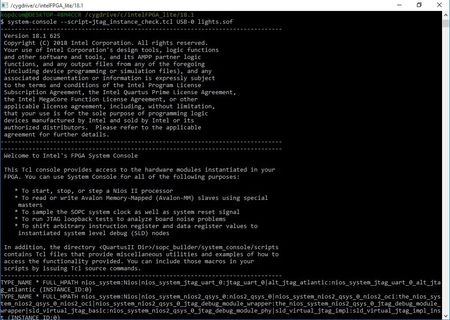
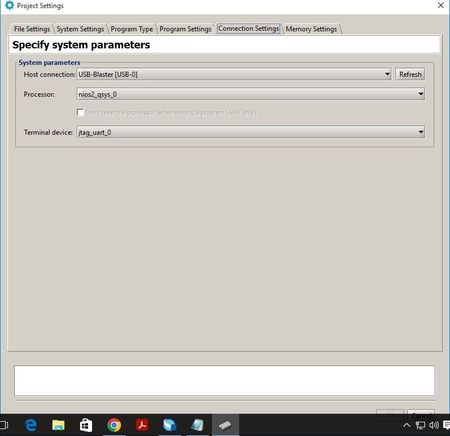
Dear Sheng, I have replaced the code section mentionned in jtag_instance_check.tcl, unfortunatly, still the same error message. I have made screen-prints of all steps: ** Nios II Console: ** Downloading the system associated with the project: -----------------------------------------------------Info& Erros:----------------------------------------------------- C:/intelFPGA_lite/18.1/quartus/bin64/quartus_pgm -c "USB-Blaster [USB-0]" --auto 1) USB-Blaster [USB-0] 020F70DD 10CL120(Y|Z)/EP3C120/.. Info: ******************************************************************* Info: Running Quartus Prime Programmer Info: Version 18.1.0 Build 625 09/12/2018 SJ Lite Edition Info: Copyright (C) 2018 Intel Corporation. All rights reserved. Info: Your use of Intel Corporation's design tools, logic functions Info: and other software and tools, and its AMPP partner logic Info: functions, and any output files from any of the foregoing Info: (including device programming or simulation files), and any Info: associated documentation or information are expressly subject Info: to the terms and conditions of the Intel Program License Info: Subscription Agreement, the Intel Quartus Prime License Agreement, Info: the Intel FPGA IP License Agreement, or other applicable license Info: agreement, including, without limitation, that your use is for Info: the sole purpose of programming logic devices manufactured by Info: Intel and sold by Intel or its authorized distributors. Please Info: refer to the applicable agreement for further details. Info: Processing started: Mon Oct 31 13:49:56 2022 Info: Command: quartus_pgm -c "USB-Blaster [USB-0]" -m jtag -o P;C:/intelFPGA_lite/18.1/lights.sof@1 Info (213045): Using programming cable "USB-Blaster [USB-0]" Info (213011): Using programming file C:/intelFPGA_lite/18.1/lights.sof with checksum 0x00687B2D for device EP4CE115F29@1 Info (209060): Started Programmer operation at Mon Oct 31 13:49:57 2022 Info (209016): Configuring device index 1 Info (209017): Device 1 contains JTAG ID code 0x020F70DD Info (209007): Configuration succeeded -- 1 device(s) configured Info (209011): Successfully performed operation(s) Info (209061): Ended Programmer operation at Mon Oct 31 13:50:04 2022 Info: Quartus Prime Programmer was successful. 0 errors, 0 warnings Info: Peak virtual memory: 312 megabytes Info: Processing ended: Mon Oct 31 13:50:04 2022 Info: Elapsed time: 00:00:08 Info: Total CPU time (on all processors): 00:00:10 ------------------------------------------------------------------------------------------------------------------------ ** After choosing COMPILE (in ACTIONS tab): ** After choosing LOAD (in ACTIONS tab): Regards...2.5KViews0likes0CommentsRe: PROBLEM LOADING with MONITOR PROGRAM 18.1 TO DE2-115
Dear Sheng, I have followed step by step as you mentionned ( https://habr.com/ru/post/464795/ ). a same message appears in the nios II console when following the steps of the solution and typing the instruction: system-console --script=jtag_instance_check.tcl USB-0 <file_name>.sof The message looks like: TYPE_NAME * FULL_HPATH nios_systeme:Nios|nios_system_jtag_quart_0....................(INSTANCE_ID:0) TYPE_NAME * FULL_HPATH nios_systeme:Nios|nios_system_nios2_qsys_0...................(INSTANCE_ID:0) Unfortunatly, the error message still occur: "could not query jtag instance ids, please ensure the fpga has been configured using the correct .sof file." But, it should to mentionned that before doing this solution, I could not selecting COMPILE or LOAD separatly in the monitor program (in ACTIONS tab) juste I could select COMPLE & LOAD, but now, I can chose COMPILE, and it's OK, but when choosing LOAD after COMPILE, the previous error return. I hope that I have well clarified. Regards...2.5KViews0likes0CommentsRe: PROBLEM LOADING with MONITOR PROGRAM 18.1 TO DE2-115
Dear Sheng, Thank you a lot for taking my request into consideration. Sorry for being late to response, but actually, I have to wait till sunday to access to our Lab and try the solution. Thank you again, and a feedback will be sent in sunday. with best regards...2.5KViews0likes0CommentsPROBLEM LOADING with MONITOR PROGRAM 18.1 TO DE2-115
Hello, I am following the tutorial that presents an introduction to PLATFORM DESIGNER tool (link bellow) https://ftp.intel.com/Public/Pub/fpgaup/pub/Teaching_Materials/current/Tutorials/Introduction_to_the_Qsys_Tool.pdf Everything is OK till the last step (in step 9 page 31), when selecting "Actions > Compile & Load" , an error message appears says: "could not query jtag instance ids, please ensure the fpga has been configured using the correct .sof file." I am using: *Quartus prime Lite edition 18.1. * Intel FPGA Monitor Program 18.1. *DE2-115 board. on Win 10. Please any one have fixed this problem. Regards...2.6KViews0likes13Comments