User Profile

FPGAfanz
 New Contributor
Joined 4 years ago


User Widgets
Contributions
Where to get the TCL Command Reference Guide for Quartus Prime
Hi, I'm a Xilinx user for many years and new to Intel FPGA. I would like to export all the IO information on the device to analyze (.e.g. double-check on the termination, pre-emphasis buffer and etc.) by using TCL command in Quartus Prime as doing the same design cross-check offered in Xilinx Vivado: https://docs.xilinx.com/r/en-US/ug835-vivado-tcl-commands/report_io I couldn't find a similar TCL command for Quartus Prime, and there doesn't have a systematic and resourceful TCL command reference document or wiki available for Quartus Prime. I used the "QUARTUS Prime Command Line and Tcl API Help" GUI but found it very not user friendly, it is slow and unable to provide the overview of all tcl command available, need to click into the package one by one... I can verify the I/O setting in the Fitter report but I prefer to export it as an excel file to analyze. May I know how to do it in Quartus Prime? it is actually very simple to do it in Vivado... Another question: is there any comprehensive documentation on the Quartus Prime TCL command available? so that the Intel FPGA user/customer can easy refer to. there is a "Quartus II Scripting Reference Mannual" available, however, it is not as useful as what have already available by the Xilinx TCL Command Reference Guide. Thanks!1.5KViews0likes3CommentsRe: Which Quartus Version has Viewing Connection/ Highlight Routing feature?
Thanks @sstrell ! Yeah, I did as per your suggestion by cross-probing from a timing path in Timing Analyzer to the Chip Planner, and now I can see the connectivity for that path and it can show the multiple paths connectivity as well.2.5KViews0likes0CommentsRe: Which Quartus Version has Viewing Connection/ Highlight Routing feature?
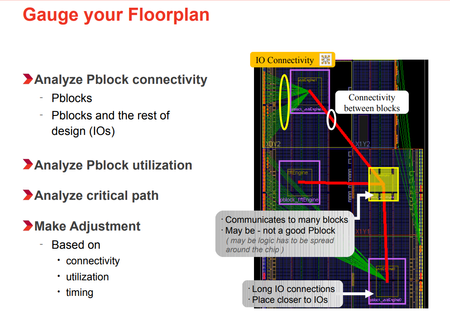
Hi @sstrell , thanks for the detailed explanation. For answering your question: >> What are you wanting to do here? Actually, I was a Xilinx User for the past 5 years and would like to switch to Intel FPGA but I'm not so familiar with the capability of Quartus tools compare to Xilinx. Hence, asking such a question. 😊 In Xilinx Floorplanner, users can easily gauge the floorplan for the Logic Lock Region connectivity, logic to IO connectivity, and logic to logic connectivity as the screenshot below: Below is the floorplan view in the Chip Planner: The connectivity schematic is available on the small window in the Chip Planner, but I don't know how to make the Chip Planner to show the connectivity on floorplan view. Here is my Layers Settings: The reason to have the connectivity view available in the flooplan is for ease me to have a gauge on how far/close between logic to logic , or logic to IO without get that information from timing report by running Timing Analyzer. May I know how can I acheive this in the Chip Planner? Thanks in advance. 🌹2.6KViews0likes4CommentsWhich Quartus Version has Viewing Connection/ Highlight Routing feature?
Hi, I was using Quartus Prime Pro 18.1 edition and noticed the chip planner doesn't have the bird's eye view routing for analyzing the routing congestion. The view routing feature is only available when with further zoom-in and can only see a portion of the routing in the zoom-in area. It is not a bird's eye view routing that can provide the overall routing congestion picture. I saw there is a "Highlight Routing" feature mentioned in the Quartus Prime Pro Chip Planner youtube video and in the pg17 of Quartus II Handbook (QII52006-13.1.0): https://www.youtube.com/watch?v=z82t12RCY_o https://www.intel.com/content/dam/support/us/en/programmable/support-resources/bulk-container/pdfs/literature/hb/qts/qts-qii52006.pdf I would like to seek advice on the following three doubts here: 1. Does the "Highlight Routing" feature in a later version has the bird's eye view routing for analyzing the routing congestion? 2. If the "Highlight Routing" feature can't provide the bird's eye view routing, may I know does the "Report Routing Utilization" in the Chip Planner can be used to analyze the routing congestion? OR what are the tools in Quartus that can be used for analyzing routing congestion? 3. Which Quartus Prime Standard and Pro version started to has the "Highlight Routing" feature? Thanks! ~CheerSolved2.9KViews0likes8Comments