Forum Discussion

 New Contributor
Questa FPGA Starter Edition Licensing Issue
I installed Questa FPGA Starter Edition and I cannot get a license for it. I have registered for the licensing site, but I still get "Account Required".
29 Replies
 rostaman
Oh, sorry. A fully qualified filename means the full path to the subdirectory plus the filename itself. You have it how I had it, with only the path to the containing folder. Instead you need something like C:\Program Installers\QuartusPrimeLite\LICENSE\licensefile.dat.
I'm not sure if that needs to also be in the System variables as well as the User, but I had to put it in User to get it to work.
Please reply back if you got it going!
 AR_A_Intel
Super Contributor
Hello
Welcome to Intel forum. Can you provide the screen shot of error?
- rostaman
Thanks for the welcome!
It's been a while and I can't seem to find my way back to that page. The Intel FPGA Licensing Support page doesn't even have the word "Questa" on it (grr). The only Starter Edition is ModelSim, which iirc isn't free.
If you could kindly direct me to the Questa Starter Edition licensing page, I'll be happy to retry and submit a screenshot.
Thanks!
- AR_A_Intel
Hi
You may request the Questa Sim Starter Edition free license here https://licensing.intel.com/
1) Go to Sign up for Evaluation or Free licenses
2) Select Questa*-Intel® FPGA Starter Edition SW-QUESTA
3) # of Seats is always 1
4) Check the T&C box
5) Click Get License button
The license will be sent to email that you register with
- rostaman
That worked, thanks so much!!
- rostaman
Well getting the license file worked, but after setting my LM_LICENSE_FILE environment variable (to it's path in C:\ on my Win11 box), I still get the same Fatal License Error that I got before. I attached the screenshot. I think it's pretty dumb that the application won't even launch.
- AR_A_Intel
Hello
Could help check again the setup. But before setting up Questa, would you kindly help check, whether your machine is supported or not (OS) by referring to link below:
https://www.altera.com/support/support-resources/download/os-support.html
For Questa software, you must set an environment variable the location of license. you need to specify location of the license file using the LM_LICENSE_FILE system variable (click/checkout the Use LM_LICENSE_FILE variable). You need to set your LM_LICENSE_FILE environment variable to point to the license that Intel provides. c:\intel\license.dat or something similar.
Please stop and restart PC after assigning.
To make this entry, you may perform a windows Search for "System Variables" and then click on "Edit the System Environment Variables" and then click "Environment Variables". Be aware that you must add the entry in System variables, not user variables.
(if you print "system v" instead, you can see it).
You can also refer this following YouTube for license setup. https://www.youtube.com/watch?v=Ob9ei5lMgGE
- rostaman
Thank you for your reply.
I checked the OS for Windows 11, and it shows Win10, which I guess means 11 is supported as well.
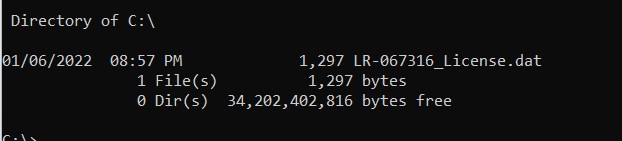
I still cannot launch Questa. My fixed license file is in C:\ and its name is LR-067316_License.dat. I have the system environment variable LM_LICENSE pointing to C:\. I have restarted the machine. I still get the dialog that I posted here earlier, which does not let me run the program.
The YouTube video is useless, since it's for Quartus, not Questa, and in the example, Quartus runs successfully, allowing the license to set up via the menu.
Pretty stupid if you ask me, with Questa not even allowing the program to load.
If you can help me I'd appreciate it.
- AR_A_Intel
To further understand the issue, could you get me the:
1) Screenshot of environment variables setup
2) Machine OS information
3) lmutil lmdiag
4) License.dat file
And for privacy, you can reply/attach your file in private message
- rostaman
- rostaman
I got it working finally. As you can see in my environment variable settings screenshot, I only used the subdirectory for my LM_LICENSE_FILE values, but it needed a fully qualified filename of the file itself. Thanks anyway!
- Hassan2311
please upload screenshot of the LM_LICENSE_FILE in environment variable . i have the same error message with fully qualified filename
 RFI
RFII am having the same issue, as are many, it would be helpful if the resolution was posted publically, these threads seem to end in private messages. thank you.
- rostaman
Great point, thank you. The ball's in my court (to provide more screenshots, and I'm being slow
). I will do this later today, and always keep the thread in public. I'm able to make great progress with my FPGA project with just discrete LEDs and 7-seg displays for testing, which is why I'm slow here. Of course, that's not sustainable! We need our simulators!!
Thanks again, and screenshots soon!- RFI
Thank you I appreciate that, but the responsibility really lands on Intel. I can't even get an email from the SSLC to validate my registration. You have gotten farther than I have!
They should post a process (that is tested and works!) , not just help people one on one and forget about it.
- RFI
Here's where I am in this loop of frustration:
- the SSLC is an endless non-functional loop:
email received after 12 hours with a link to the same place I started:
Link goes back where I started and around and around we go...
(chat support is no help - points to this forum)
- RFI
I found this link in another post.
This appears to be the place - the email links and everything else that leads to the above loop needs to be fixed.
- RFI
So now I am where the OP was when he went private:
Can Intel please post a solution publically?
Does the license file have to be somewhere special? I tried saving to C:/flexlm but was not allowed access to save it there.
There appears to be a conflict with a Xilinx license? I need both.
C:\Users\RF>lmutil lmdiag
lmutil - Copyright (c) 1989-2019 Flexera. All Rights Reserved.
FlexNet diagnostics on Mon 1/17/2022 12:06-----------------------------------------------------
License file: C:\Users\RF\AppData\Roaming/XilinxLicense\Xilinx - Copy.lic
-----------------------------------------------------
"XC7Z020_EMBEDDED" v2022.03, vendor: xilinxd, expiry: permanent(no expiration date)
vendor_string: [email protected],XC7Z020_EMBEDDED,software,permanent,_200503949_208823071_210739961_606
uncounted nodelocked license, locked to ethernet address "b89a2a3a225d" no expiration dateTS_OK: Checkout permitted when client is using terminal client
This is the correct node for this node-locked license
-----------------------------------------------------Enter <CR> to continue:
I am using:
Edition Windows 10 Pro
Version 20H2
Installed on 4/7/2021
OS build 19042.1466
Experience Windows Feature Experience Pack 120.2212.3920.0- rostaman
You may want to start a new thread, since nobody has gone private on this one. I'm still going to submit my screenshots later, and I want to make sure the assistant that asked for them gets them.
- RFI
Thank you rostaman whatever you went through to get through the LM_LICENSE_FILE environment variable problem would be helpful.
- RFI
That did it! Thanks so much rostamon. I am on my way. I do not know why that was not clear from what I have read, typically variables just point to the folder.
Let me know if I can return the favor further down the line.
- rostaman
Woo00t, RFI! I'm so glad it helped.
Thanks for the offer, I'll be sure to message you if I need something!!
 thevene07
Hi Rostaman,
I'm facing the same issue as you and I did all you said the previous posts. I have set the environment variable to the license file itself. But I still get the error in the screenshot you sent. Can you please help me?
- AR_A_Intel
Thanks for all the update, hope all is well. This thread will be transitioned to community support. If you have a new question, feel free to open a new thread to get the support from Intel experts. Otherwise, the community users will continue to help you on this thread. Thank you